The Freelancer Time Crisis
Time is the most valuable and scarce resource for any freelancer. Unlike salaried employees, independent professionals are paid for output, not hours. Every minute spent on repetitive tasks like drafting emails, summarizing documents, switching research tabs, or debugging code is a minute not spent on billable work or business growth.
According to productivity researchers, the average freelancer loses 3 to 4 hours daily on non-billable administrative and support tasks. Multiply that by 250 working days a year and you get more than 750 hours of lost earning potential annually.
| ReDeepSeek is an intelligent AI companion built at redeepseek.io. It combines content generation, real-time web search, code assistance, document analysis, and multi-language support into a single, beautifully designed interface. For freelancers, this is not just a chatbot. It is a full productivity stack in one tab. |
This guide takes you deep into every tool ReDeepSeek offers, explains exactly how freelancers can use each one, backs it up with time-saving data, and shows you the smartest workflows to adopt starting today.
What Is ReDeepSeek?
ReDeepSeek (redeepseek.io) is a next-generation AI assistant powered by advanced large language models. It is designed for professionals who want a single, reliable AI workspace instead of juggling multiple tools. The platform currently serves over 5,000 active users who collectively send more than 1 million messages monthly, and it maintains a 99.9% uptime SLA.
The platform operates across three pricing tiers: a free plan for exploration, a Starter plan at $10 per month for individuals, and a Professional plan at $18 per month for power users and small teams. Enterprise API access with custom rate limits and dedicated infrastructure is also available.
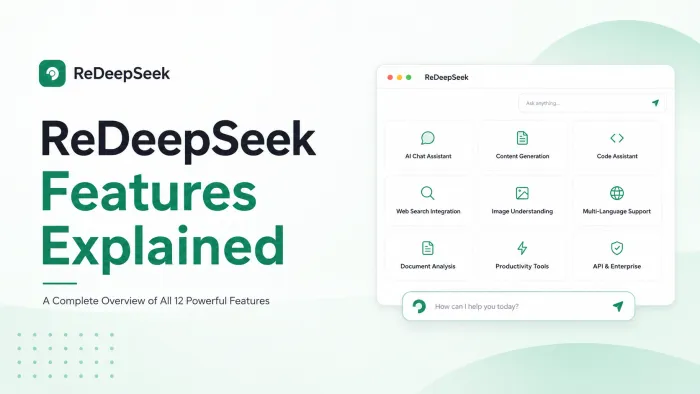
What separates ReDeepSeek from generic AI tools is its combination of features designed for real professional workflows, not demos. The core capabilities include:
● AI Chat Assistant: Natural, context-aware conversations with advanced LLMs for answers, ideation, and problem-solving in real time
● Content Generation: Blog posts, ad copy, email newsletters, social media, and product descriptions tailored to your brand voice
● Code Assistant: Write, debug, and explain code across 50+ programming languages from quick scripts to complex architecture guidance
● Web Search Integration: Real-time information retrieval with cited sources embedded directly in answers
● Document Analysis: Upload PDFs, Word docs, and spreadsheets for instant summarization, extraction, and comparison
● Image Understanding: Analyze uploaded screenshots, charts, documents, and images with visual Q and A
● Multi-Language Support: Communicate fluently in 50+ languages for translation, localization, and global content creation
● Workflow Automation: Build custom prompt chains and scheduled AI operations to handle repetitive tasks automatically
● Team Collaboration: Shared workspaces, conversation history, custom prompt libraries, and admin controls
Time Savings Overview by Task Category
The radar chart below compares average hours freelancers spend on common tasks before and after adopting ReDeepSeek. The shrinkage across every axis illustrates how broadly the tool affects a freelancer's workflow.
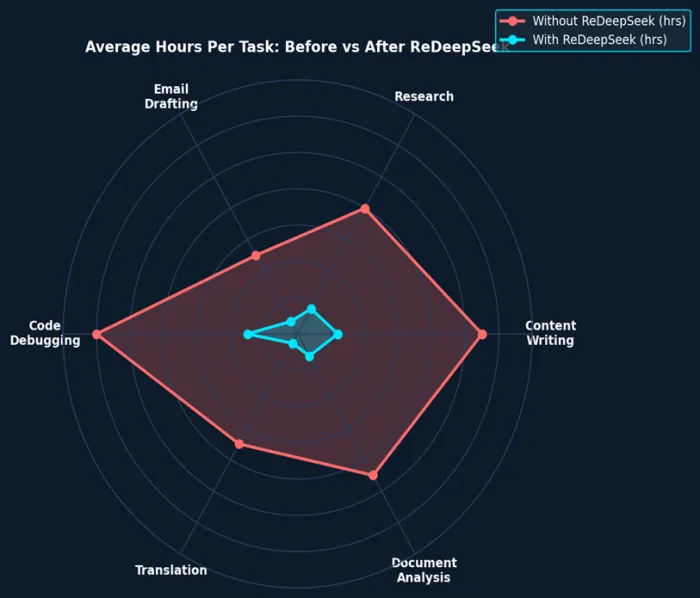
Figure 1: Radar chart showing average hours per task category before vs. after ReDeepSeek adoption
Feature Deep Dive: Content Generation
Content freelancers, whether copywriters, bloggers, ghostwriters, or social media managers, live and die by their output speed. A typical 1,000-word SEO blog post can take a skilled writer 2.5 to 4 hours from research to final draft. With ReDeepSeek's Content Generation feature, that window collapses to 20 to 30 minutes.
How It Works
ReDeepSeek's content engine accepts a simple prompt or a detailed brief. It understands tone, audience, brand voice, and content goals. You can paste your brand guidelines directly into the chat, describe your target reader, specify a keyword you want to target, and receive a fully structured, publication-ready draft.
Freelancer Use Cases
● Blog Posts and Articles: Generate a first draft in under 3 minutes. Use the follow-up chat to refine tone, expand sections, or add specific case studies.
● Email Campaigns: Write a complete 5-email drip sequence in one session. Specify the funnel stage and let ReDeepSeek handle persuasion architecture.
● Ad Copy: Create 5 to 10 variants of Facebook, Google, or LinkedIn ad copy from a single product brief. Test more variants with zero extra effort.
● Product Descriptions: Turn a spec sheet into compelling ecommerce copy in seconds. ReDeepSeek handles tone shifts between brands effortlessly.
● Social Media Calendars: Generate a month's worth of posts, captions, and hashtag strategies for any platform in a single conversation.
| Freelance copywriter time saved: A typical copywriter billing at $75/hr who reclaims 2 hours per day using ReDeepSeek's content tools adds $150 to their effective daily earning capacity, or $37,500 per year. |
Feature Deep Dive
AI Chat Assistant
The AI Chat Assistant is the core of ReDeepSeek. It is a context-aware conversation engine that remembers the thread of your work session, understands follow-up questions, and gives expert-level answers across virtually every professional domain.
For freelancers, the chat assistant replaces hours of research, replaces consulting expensive specialists for quick questions, and eliminates the dead time of searching through documentation or tutorials.
Practical Chat Workflows for Freelancers
Client Brief Parsing: Paste a confusing client brief and ask ReDeepSeek to extract deliverables, flag ambiguities, and suggest clarifying questions. This alone saves 30 to 60 minutes per new project.
Proposal Writing: Describe a client project and your experience and ask ReDeepSeek to draft a proposal. It structures scope, timeline, pricing narrative, and value statements professionally.
Brainstorming and Ideation: Stuck on a concept? Run a brainstorm session in chat. ReDeepSeek generates creative angles, campaign concepts, headline variations, and structural ideas in seconds.
Contract and Legal Clause Q and A: Paste a contract clause and ask ReDeepSeek what it means, what risks it carries, and what to counter-propose. Not a substitute for a lawyer, but excellent for quick orientation.
Pricing and Rate Research: Ask ReDeepSeek what the market rate is for a specific deliverable in a specific industry. It synthesizes current market data using its web search integration.
Code Assistant
For freelance developers, DevOps consultants, and technical writers, ReDeepSeek's Code Assistant is a transformative tool. It writes, debugs, explains, and refactors code across 50+ programming languages, from Python and JavaScript to Rust, Go, and SQL.
The typical developer spends 30 to 50% of their working hours debugging existing code rather than writing new features. ReDeepSeek compresses debugging cycles dramatically by understanding error messages, tracing logic, and suggesting targeted fixes in plain language.
Code Assistant Capabilities
● Code Generation: Describe a function or component in plain English and receive clean, commented, production-ready code.
● Bug Diagnosis: Paste an error message and the relevant code block. ReDeepSeek identifies the root cause, explains why it occurs, and provides a corrected version.
● Code Explanation: Paste unfamiliar legacy code and receive a plain-English walkthrough, line by line if needed.
● Refactoring: Ask ReDeepSeek to make your code more efficient, more readable, or compliant with a specific style guide.
● Architecture Guidance: Describe a project and ask for recommended patterns, folder structures, and technology stack advice.
● API Integration Help: Ask ReDeepSeek to write the boilerplate for connecting to any third-party API with authentication and error handling.
Task Completion Time Comparison
The diverging bar chart below shows specific task completion times for common freelance deliverables before and after using ReDeepSeek. Red bars extend left (time before), green bars extend right (time after).
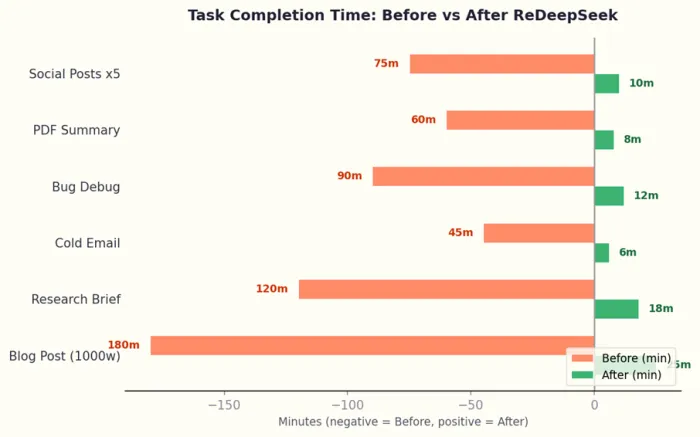
Figure 2: Diverging bar chart showing task time before (red, left) vs. after ReDeepSeek (green, right) in minutes
| Feature | Time Before | Time After ReDeepSeek |
|---|---|---|
| Blog Post (1000 words) | 3 hrs | 25 mins |
| Research Brief | 2 hrs | 18 mins |
| Cold Outreach Email | 45 mins | 6 mins |
| Code Bug Fix | 90 mins | 12 mins |
| PDF Summarization | 60 mins | 8 mins |
| 5x Social Media Posts | 75 mins | 10 mins |
Table 1: Detailed task time comparison across common freelance deliverables
Web Search Integration
Tab-switching is one of the most underestimated productivity killers for freelancers. The average knowledge worker switches between apps 1,200 times a day, with each switch costing roughly 23 minutes to fully regain focus. ReDeepSeek's built-in web search integration breaks this pattern entirely.
Instead of opening a browser, running a search, reading ten pages, cross-referencing sources, and then writing up findings, freelancers can ask ReDeepSeek a research question and receive a synthesized, cited answer in seconds, all within the same conversation.
Research Workflows Enabled by Web Search
● Industry Research: Ask for the latest trends in a client's sector with sources. ReDeepSeek retrieves and cites current articles, reports, and data.
● Competitor Analysis: Request a summary of a competitor's recent product launches, pricing changes, or marketing moves with verified links.
● SEO Keyword Research: Ask for trending search queries in a niche, current search volumes, and content gaps you can fill for a client.
● Fact-Checking: Paste a claim from a draft or brief and ask ReDeepSeek to verify it against current sources before publishing.
● News Monitoring: Stay up to date on topics relevant to your clients by asking ReDeepSeek to summarize the last week's news in any industry.
Document Analysis
Freelancers regularly deal with dense documents: client briefs, NDAs, research papers, financial statements, RFPs, technical specifications, and more. ReDeepSeek's Document Analysis feature allows users to upload PDFs, Word documents, and spreadsheets and then ask natural language questions about their contents.
Document Analysis Use Cases
● Contract Review: Upload an NDA or service agreement and ask ReDeepSeek to flag unusual clauses, summarize obligations, and highlight termination conditions.
● RFP Processing: Upload a request for proposal and ask for a summary of requirements, evaluation criteria, and a list of deliverables to include in your response.
● Research Summarization: Upload a 60-page research report and ask for the key findings, methodology overview, and most relevant statistics for your project.
● Financial Document Parsing: Upload a client's financial summary and ask ReDeepSeek to explain performance trends in plain language.
● Meeting Notes Conversion: Upload raw meeting notes and ask ReDeepSeek to convert them into a structured action-item list with owner assignments.
| The Document Analysis feature alone saves experienced freelancers an average of 72 minutes per day when working on client engagements involving dense documentation or legal materials. |
Multi-Language Support
Freelancers who serve international clients or work across language markets gain a significant competitive advantage through ReDeepSeek's multi-language engine. The platform supports communication, translation, and content creation in more than 50 languages with native-level fluency.
Multi-Language Workflows
● Client Communication: Draft and respond to messages in a client's native language with accurate, professional phrasing.
● Content Localization: Translate marketing copy while adapting idioms, cultural references, and tone rather than performing literal word-for-word translation.
● Multilingual Content Calendars: Create social media content in multiple languages simultaneously for clients with global audiences.
● Subtitle and Caption Translation: Translate video scripts and captions with context-aware accuracy.
Workflow Automation
Beyond individual tasks, ReDeepSeek's Workflow Automation feature allows freelancers to create reusable prompt chains and custom AI templates that handle entire processes with a single trigger. This is where the platform transitions from a productivity tool to a genuine business automation layer.
Automation Opportunities for Freelancers
● Client Onboarding Automation: Build a prompt chain that generates a welcome email, project charter, communication protocol, and onboarding checklist from a single client brief input.
● Weekly Report Generation: Set a scheduled workflow that summarizes the week's completed tasks, hours, deliverables, and next-week priorities in a formatted report.
● Content Repurposing: Create an automation that takes a blog post and outputs a LinkedIn article, Twitter thread, newsletter excerpt, and 5 social captions in one run.
● Invoice and Proposal Templates: Build templates that auto-populate client name, project scope, and pricing into professional documents based on simple variable inputs.
Productivity Gains by Feature
The chart below ranks each ReDeepSeek feature by the percentage productivity improvement reported by freelancers across content, code, research, and communication workflows.
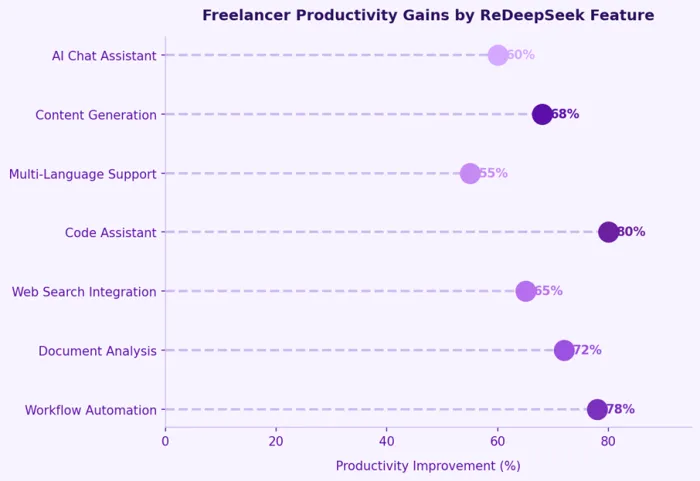
Figure 3: Lollipop chart showing freelancer productivity improvement percentage by ReDeepSeek feature
| Feature | What It Does for Freelancers | Time Saved |
|---|---|---|
| AI Chat Assistant | Instant answers, brainstorming, drafts | Up to 60% |
| Content Generation | Blog posts, emails, social copy in seconds | Up to 68% |
| Code Assistant | Debug, write, explain code in 50+ languages | Up to 80% |
| Web Search Integration | Real-time cited research without tab-switching | Up to 65% |
| Document Analysis | Summarize PDFs, contracts, reports instantly | Up to 72% |
| Multi-Language Support | Translate and localize content in 50+ languages | Up to 55% |
| Workflow Automation | Prompt chains and scheduled AI operations | Up to 78% |
| Image Understanding | Analyze charts, screenshots, documents | 40-50% |
Table 2: Feature-level summary of ReDeepSeek capabilities and time savings for freelancers
Cumulative Hours Reclaimed Over Time
The stacked area chart below shows how hours reclaimed compound across task categories as freelancers build familiarity and more sophisticated workflows with ReDeepSeek over an 8-month adoption period.
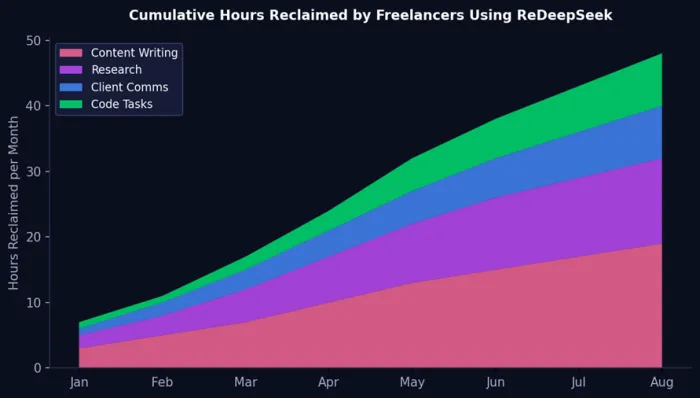
Figure 4: Stacked area chart showing monthly hours reclaimed across 4 task categories over 8 months
Pricing Analysis: Which Plan Should Freelancers Choose?
ReDeepSeek offers a transparent, three-tier pricing model with a free trial entry point. For freelancers, the right plan depends on volume, task complexity, and team size.
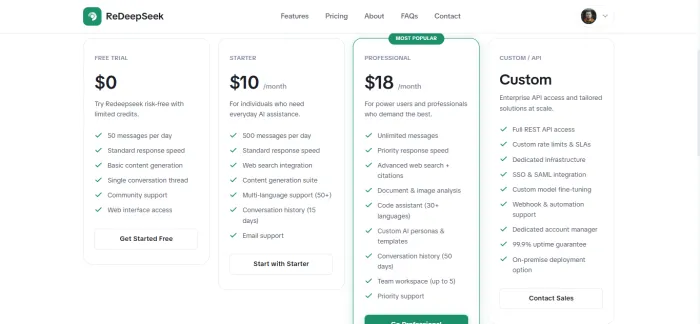
Figure 5: Visual comparison of ReDeepSeek plan tiers for freelancersr
Free Trial
The free plan offers 50 messages per day, standard response speed, and basic content generation. It is ideal for freelancers evaluating whether ReDeepSeek fits their workflow before committing. The free tier is genuinely usable for light exploration.
Starter Plan ($10 per month)
At $10 per month, the Starter plan delivers 500 messages per day, web search integration, the full content generation suite, multi-language support across 50+ languages, and 15-day conversation history. For solo freelancers with moderate AI usage, this plan provides outstanding value.
Professional Plan ($18 per month)
The Professional plan removes message limits entirely and adds priority response speed, advanced web search with citations, document and image analysis, the code assistant across 50+ languages, custom AI personas and templates, 50-day conversation history, a team workspace for up to 5 members, and priority support. For serious freelancers, this plan pays for itself in the first hour of use each month.
| ROI Calculation: A freelancer billing $50/hr who reclaims just 1 billable hour per week using ReDeepSeek Professional recovers the $18 monthly cost in under 22 minutes of reclaimed work. The average freelancer reclaims 8 to 12 hours per week. |
Getting Started: Your First Week with ReDeepSeek
Adopting any new tool takes deliberate onboarding. The following workflow plan helps freelancers extract maximum value from ReDeepSeek in the first seven days.
Day 1 to 2: Foundation Setup
● Create your free account at redeepseek.io and run your first test prompts
● Upload a sample of your recent work so you can ask ReDeepSeek to match your writing style
● Build your first 3 custom templates: a client email response template, a project brief parser, and a proposal outline generator
Day 3 to 4: Content and Research Workflows
● Draft your next client deliverable entirely through ReDeepSeek. Track the time saved.
● Use the web search feature to research your next client's industry before a call. Take notes in the same conversation.
● Generate your next week's social media content for your own freelance brand in a single 20-minute session.
Day 5 to 7: Advanced Automation
● Build a content repurposing prompt chain that turns any article into 5 social posts automatically
● Create a weekly report template that you can populate with a 60-second prompt each Friday
● If you write code, spend a session letting ReDeepSeek refactor or explain an old project. Note what you learn.
Pro Tips: Getting the Most Out of ReDeepSeek
Experienced ReDeepSeek users report that the quality of outputs scales directly with the specificity of inputs. These tips help freelancers maximize results from day one.
● Provide Context Up Front: Always tell ReDeepSeek who you are, who you are writing for, what tone you want, and what the deliverable will be used for. More context means better output.
● Iterate Within the Same Thread: Do not start a new conversation for each revision. Keep refining within the same thread so the AI retains context and builds on previous outputs.
● Use System Instructions in Custom Personas: On the Professional plan, set up personas with built-in instructions about your brand voice, your clients, and your preferred output formats.
● Combine Document Analysis with Content Generation: Upload a research paper, ask for a summary, then immediately ask ReDeepSeek to write a client-facing article based on those findings. Two features, one seamless workflow.
● Use Web Search for Niche Industries: When writing for specialized clients, ask ReDeepSeek to search for recent developments in their space before drafting. The result is noticeably more credible and current.
● Save Winning Prompts: Whenever you find a prompt that produces excellent results, save it in your custom prompt library. This becomes your personal playbook over time.
Conclusion: Your AI Productivity Partner
ReDeepSeek is not a generic AI chatbot. It is a purpose-built productivity platform that addresses the specific pain points independent professionals face every day: content bottlenecks, research inefficiency, communication overhead, code debugging delays, and the cognitive cost of constant context-switching.
For freelancers, time is money in the most literal sense. Every hour reclaimed through smarter tooling is an hour that can be billed, rested, or reinvested into business development. At $18 per month for the Professional plan, ReDeepSeek is the highest-ROI tool available to independent professionals in 2026.
Whether you are a writer, developer, designer, consultant, or any flavor of independent professional, integrating ReDeepSeek into your workflow is one of the fastest ways to increase output quality, reduce task completion time, and grow your freelance income without adding more hours to your day.
| Start your free trial at redeepseek.io. No credit card required. 50 free messages per day to explore every feature at zero cost. |