THE 30-SECOND VERDICT Short answer: yes but not the way the question implies. RedeepSeek is not a website builder, a drag-and-drop editor, or a design canvas like Figma or Webflow. It is a general-purpose AI assistant. What it does well is the thinking, writing, coding and reviewing that surround the visual design and it does all of that on a plan that starts at $0 and tops out at $18 a month. Best for: research, copy and UX text, front-end code (HTML/CSS/JS), design critique and localization. Not for: producing finished graphics, pixel-level visual design, or replacing a designer’s eye. |
The data: why design is a business decision, not decoration
Visitors decide whether they trust a website almost instantly. Research from Stanford’s Web Credibility Project widely cited by WebFX and HubSpot finds that roughly 94% of first impressions are tied to visual design (layout, color, typography, spacing), and people form that judgment in about 50 milliseconds, before reading a single word. Three-quarters of consumers admit they judge a company’s credibility on how its site looks.
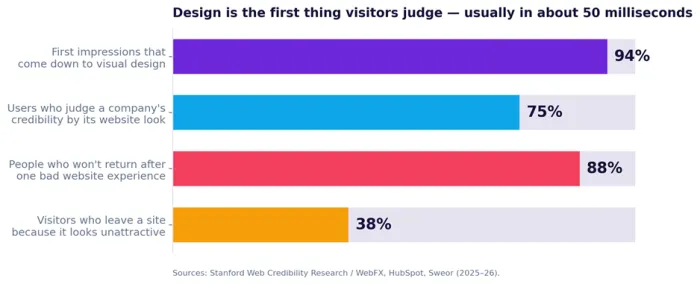
Figure 1 How much of a visitor’s first judgment comes down to design. Sources: Stanford / WebFX, HubSpot, Sweor (2025–26).
The cost of getting it wrong is measurable. Around 38% of people stop engaging with a site they find unattractive, and 88% say they won’t return after a single bad experience.
Speed is part of design
Design isn’t only how a site looks it’s how fast it feels. Shopify’s load-time research shows a page that loads in one second converts about three times better than one that takes five. BrowserStack puts visitor abandonment near 40% once load time passes three seconds, and Google’s data pushes that above 50% on phones where, by 2025, roughly 62% of all web traffic now lives.
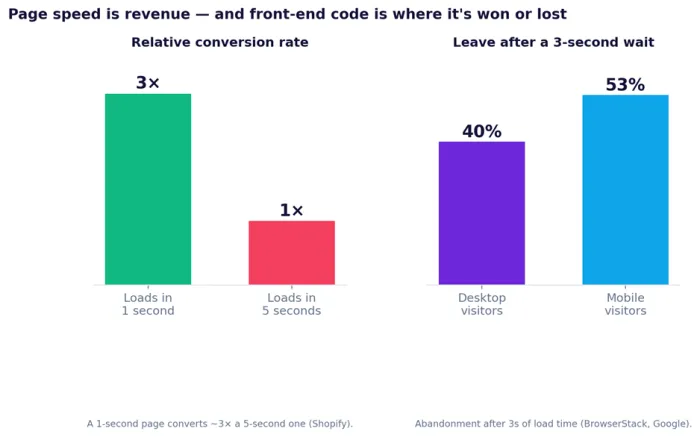
Figure 2 Page speed maps directly to conversions and bounce. Sources: Shopify, BrowserStack, Google (2024–25).
94% of first impressions are design-driven | 50ms to form an opinion of your site | 3× more conversions at 1s vs 5s load | 62% of web traffic is on mobile |
WHY THIS MATTERS FOR THE REST OF THIS GUIDE Every one of these levers clearer copy, faster code, a cleaner layout, a working mobile experience is something an AI assistant can help you move. That is the real case for using a tool like RedeepSeek in design: not to replace taste, but to remove friction from the work that surrounds it. |
What RedeepSeek actually is (and what it isn’t)
RedeepSeek (redeepseek.io) describes itself as an “intelligent AI companion” a single assistant for generating content, writing code, analyzing documents, searching the web and answering questions. It is powered by large language models and, by its own numbers, serves 5,000+ active users, has handled over a million messages, supports 50+ languages, and advertises 99.9% uptime.
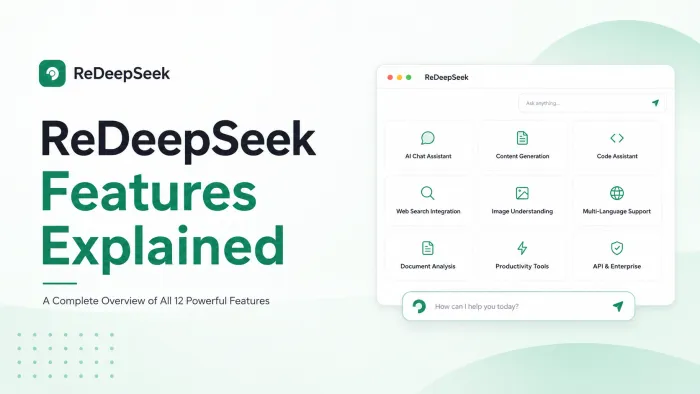
Its published feature set spans twelve capabilities:
• AI Chat Assistant context-aware conversation and problem-solving
• Content Generation blog posts, emails, ad and social copy, product descriptions
• Code Assistant writing, debugging and explaining code across 30+ languages
• Web Search Integration real-time answers with citable sources
• Image Understanding analyzing and extracting information from images, charts and screenshots
• Multi-Language Support 50+ languages for translation and localization
• Advanced Reasoning step-by-step logic for analysis and planning
• Document Analysis summarizing PDFs, Word files and spreadsheets
• API Access a REST API with SDKs for integration
• Enterprise Security SOC 2-compliant, encrypted, role-based access
• Team Collaboration shared workspaces and prompt libraries
• Workflow Automation reusable templates and prompt chains
Read that list carefully and one thing stands out for design work: RedeepSeek understands images, but its feature set does not claim to generate them. There is no drag-and-drop builder, no visual canvas, and no “type a sentence, get a finished web page” generator. It sits much closer to an assistant like ChatGPT or Claude than to a website builder like Wix, Squarespace or Webflow or a design tool like Figma.
| What RedeepSeek IS | What RedeepSeek is NOT |
|---|---|
● A conversational AI assistant for text, code and analysis ● A strong writing and editing partner ● A capable front-end coding helper (HTML, CSS, JS, React) ● A second pair of eyes on screenshots and mockups ● A research, summarization and localization engine ● Affordable from $0 to $18 per month | ● A website builder or hosting platform ● A drag-and-drop or no-code visual editor ● A design canvas (not a Figma or Webflow) ● An image, logo or illustration generator ● A publishing or deployment tool ● A replacement for a designer's judgment |
Where an AI assistant actually fits into web design
If RedeepSeek isn’t the canvas, where does it help? The honest answer: almost everywhere except the canvas itself. Designing or redesigning a site is a process, and most of that process is research, writing, coding and reviewing exactly the work language models are built for. Using AI here is no longer exotic: McKinsey’s State of AI survey found 78% of organizations were using AI in 2024, up from 55% a year earlier, and HubSpot reports a majority of designers already lean on AI to produce imagery and other media.
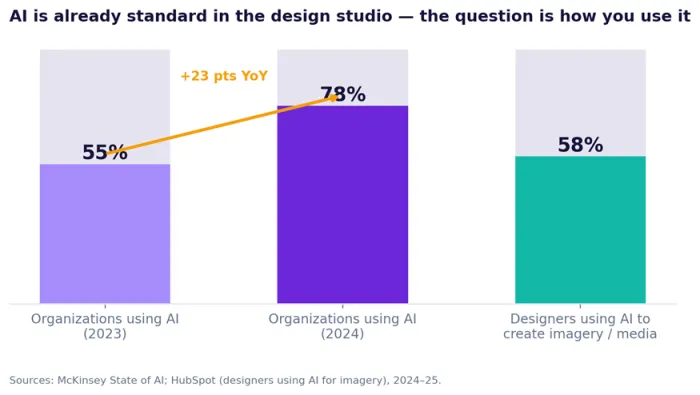
Figure 3 AI adoption has become mainstream. Sources: McKinsey State of AI; HubSpot (2024–25).
The map below breaks the work into six stages and shows which RedeepSeek capability earns its keep at each one.
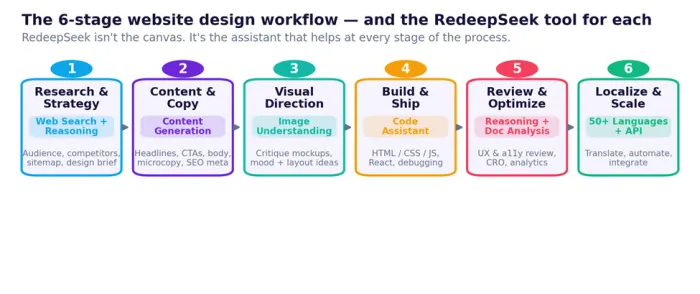
Figure 4 The six-stage workflow and the RedeepSeek tool for each stage.
Stage 1 Research & strategy
Capability: Web Search + Advanced Reasoning. Before any pixels, you need to know who the site is for, what competitors do, and what it must accomplish. Use web search to pull current competitor approaches and design trends with citable sources, then reasoning to turn that into a sitemap, page goals and a tight design brief.
TRY THIS PROMPT “Act as a UX strategist. My client is an independent dental clinic in Austin. Research three competitor websites, summarize their homepage structure and calls-to-action, then propose a sitemap and a one-page design brief with primary goals and target audience.” |
Stage 2 Content & copy
Capability: Content Generation + Multi-Language. A layout is only as good as the words inside it. Draft headlines, hero subtext, feature descriptions, button microcopy, FAQ answers and SEO title/meta tags in your brand voice, then refine them in conversation. Around 70% of small-business homepages still lack a clear call to action, and clear CTAs convert roughly 40% better so this stage pays off fast.
TRY THIS PROMPT “Write homepage copy for the dental clinic: a hero headline (max 8 words), a one-sentence subhead, three benefit blocks with icons described, and two CTA button options. Friendly, reassuring, not salesy. Then add an SEO title and a meta description under 155 characters.” |
Stage 3 Visual & layout direction
Capability: Image Understanding + Chat. Here you must be realistic. RedeepSeek will not generate your mockups or images but it can react to them. Upload a screenshot of a draft layout or a competitor page and ask for a structured critique of hierarchy, spacing, contrast and clarity, or brainstorm layout patterns and section order in plain language. Think art-director feedback, not a rendering engine.
TRY THIS PROMPT “Here’s a screenshot of my homepage draft. Critique the visual hierarchy, spacing and color contrast. Is the primary CTA obvious within the first 50 milliseconds? Suggest three specific layout changes, ranked by impact.” |
Stage 4 Build & ship
Capability: Code Assistant. This is RedeepSeek’s strongest design-adjacent muscle. It writes and explains front-end code across 30+ languages semantic HTML, modern CSS (Flexbox and Grid), vanilla JavaScript, and framework code such as React with Tailwind and debugs what breaks. Because page speed is conversion (remember the 1-second-versus-5-second gap), asking it to flag heavy assets, add lazy-loading or tighten your CSS has a direct revenue payoff.
TRY THIS PROMPT “Build a responsive, accessible hero section in HTML and Tailwind CSS from this copy [paste]. Mobile-first, semantic landmarks, an aria-labelled CTA, and a lazy-loaded background image. Then explain how to reduce its largest-contentful-paint time.” |
Stage 5 Review & optimize
Capability: Advanced Reasoning + Document Analysis + Image Understanding. Once a page exists, RedeepSeek becomes a reviewer. Paste your markup for an accessibility and semantic review (alt text, heading order, contrast, keyboard focus), ask for conversion ideas grounded in UX principles, or drop an analytics export into document analysis and have it summarize where users drop off and what to test next.
TRY THIS PROMPT “Review this page’s HTML for WCAG 2.2 AA issues contrast, alt text, heading order, focus states and list fixes by severity. Then suggest three A/B tests to lift the contact-form conversion rate.” |
Stage 6 Localize & scale
Capability: Multi-Language + API + Workflow Automation. With 50+ languages, RedeepSeek can translate and localize copy for new markets adapting tone and idiom rather than translating word for word. For teams shipping at volume, the REST API and workflow templates let you wire content generation or QA checks straight into your own pipeline.
TRY THIS PROMPT “Translate this landing-page copy into Spanish and French for a European audience. Localize idioms and CTAs rather than translating literally, and keep each headline within the same character count as the English.” |
An honest scorecard
Put it together and a clear pattern emerges. RedeepSeek is excellent at the language-, code- and analysis-heavy parts of design, and genuinely weak at producing finished visuals. The scorecard below rates it across the tasks a real website project demands.
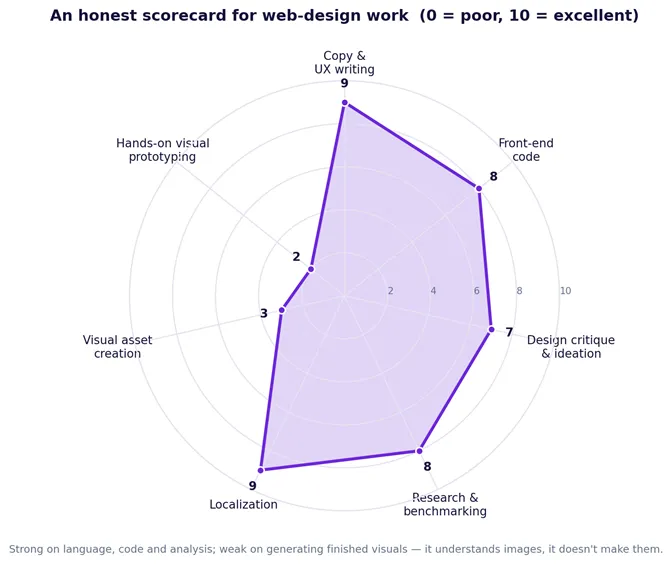
Figure 5 Strong on language, code and analysis; weak on creating finished visuals.
The same story shows up when you map each capability to specific tasks. Notice the entire “visual asset creation” column there is no strong fit anywhere in it, because creating original graphics, logos or photography simply isn’t what this tool does.
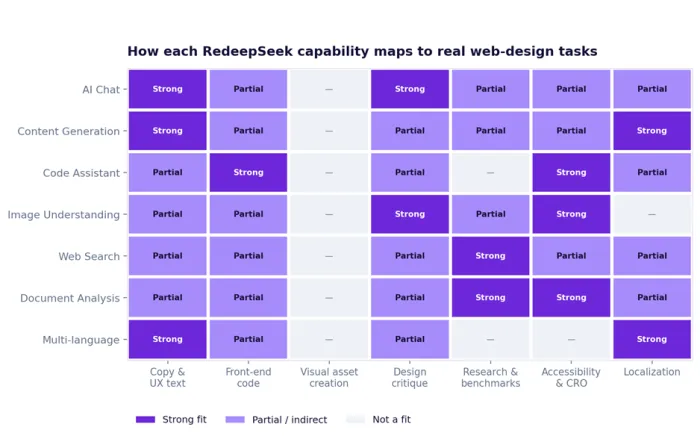
Figure 6 Capability-to-task fit. Dark = strong, light = partial, blank = not a fit.
A realistic walk-through
redesigning a landing page in an afternoon
The example below is illustrative a plausible workflow, not a guaranteed result but it shows how the six stages fit together in practice.
1. Brief (15 min). Ask RedeepSeek to research three competitors and draft a one-page brief with goals, audience and a sitemap. You edit it down to what matters.
2. Copy (20 min). Generate hero, benefit, FAQ and CTA copy in your brand voice, plus SEO meta tags. Iterate two or three times until the wording feels right.
3. Direction (15 min). Sketch a rough layout, screenshot it, and ask for a hierarchy-and-contrast critique. Apply the top three suggestions.
4. Build (45 min). Have it generate responsive, accessible HTML and Tailwind for each section, paste that into your builder or codebase, and ask it to debug anything that misbehaves.
5. Review (20 min). Paste the final markup back for a WCAG and performance pass, and get a short list of A/B tests.
6. Localize (10 min). Translate the page into one or two target languages localized, not literal.
None of this replaces a designer but a solo founder or small team can move from blank page to a tested, accessible, multilingual draft in an afternoon, with the AI handling the parts that usually cause the most friction.
Where RedeepSeek stops and what to pair it with
A guide that promised AI could do everything would be exactly the kind of false information this one is trying to avoid. RedeepSeek has real limits for design work:
• No visual canvas or editor. You can’t drag, drop or nudge anything; it returns text and code, not an editable design surface.
• It doesn’t create images. Logos, illustrations, photography and icon sets all come from elsewhere its strength is understanding images you provide, not generating new ones.
• It can’t publish or host. RedeepSeek writes the code; deploying and hosting the live site happens in your own stack.
• Output still needs human judgment. Even with strong models, brand voice, taste and final quality are yours to own which is exactly why 78% AI adoption hasn’t made designers obsolete.
The practical move is to treat RedeepSeek as the assistant at the center of a small toolkit:
• Pair it with a builder or CMS WordPress, Webflow, Wix or Framer to assemble and publish the site.
• Pair it with a design tool Figma or similar for visual layout and design systems.
• Pair it with an image source a dedicated image generator or a stock/illustration library for the visuals it can’t make.
• Pair it with analytics and accessibility checkers to close the measurement loop.
Pricing: which plan for which design job
RedeepSeek’s pricing is refreshingly simple, and for most design work you won’t need the top tier. All plans include SSL encryption and GDPR compliance, and annual billing saves 20%.
| Plan | Price | Best for your design work | Worth noting |
|---|---|---|---|
| Free Trial | $0 | Testing the waters a few pieces of copy and code snippets | 50 messages/day; single thread |
| Starter | $10 / mo | Ongoing copywriting, research and localization for solo work | 500 messages/day; web search; 50+ languages |
| Professional | $18 / mo | Active building and small teams the sweet spot | Unlimited messages; code + image + document analysis; 5-seat workspace |
| Custom / API | Custom | Productizing or shipping at scale | REST API, SSO/SAML, custom limits, on-prem option |
• Just exploring? The free trial (50 messages/day) is enough to test copy and a few code snippets.
• Solo or light use? Starter ($10/mo, 500 messages/day) covers ongoing copywriting, research and localization with web search.
• Actively building or in a small team? Professional ($18/mo) is the sweet spot unlimited messages, document and image analysis, the code assistant, custom personas and a 5-seat workspace.
• Productizing or shipping at scale? Custom/API adds REST access, SSO/SAML, custom rate limits and an on-prem option.
The bottom line
So can RedeepSeek improve your website design? Yes, with an honest asterisk. It won’t draw your site or replace your designer. But as an always-available assistant for research, copy, front-end code, critique and localization, it can measurably improve the parts of design that decide whether visitors trust you in the first 50 milliseconds and it can do it for the price of a couple of coffees a month. Used as a co-pilot rather than an autopilot, it’s a genuine upgrade to almost any web-design workflow.
TRY IT YOURSELF The free tier costs nothing and takes about ten seconds to set up at redeepseek.io. Start by asking it to critique your current homepage the response will tell you quickly how much it can help. |