ADOPT 91% of businesses now use AI in at least one capacity | IMPACT 39% report measurable profit impact from it | SCALE 16% have scaled AI across the whole organization |
The drop-off from 91 to 16 is the whole problem. The tool is rarely the reason. Fit and process usually are.
The best question is not which assistant is most advanced. It is which one fits the job, your systems, and the level of control you need.
Adoption is no longer the hard part. Roughly nine in ten organizations already use AI somewhere, yet most are stuck in pilots, and only a minority can point to a clear return. The pattern across the research is consistent: the projects that fail rarely fail because the model was weak. They fail because the tool did not fit a real workflow, did not connect to the systems people already use, or shipped without the security and ownership a business needs.
So this guide is built backwards from that reality. First, know the five kinds of assistant you are actually choosing between. Then run every option through one fit test. Then match the result to your situation, watch for the red flags, and roll it out in a way that proves value before you scale.
STEP 1 · KNOW THE FIELD
The five kinds of business AI assistant
“AI assistant” covers very different products. Naming the category you need narrows the field faster than comparing feature lists. Most businesses end up combining two or three of these.
| A | General-purpose work assistants ChatGPT, Claude, Gemini, Copilot Chat |
Chat-based helpers for drafting, summarizing, research, analysis, and brainstorming. Broad and flexible, but they work in their own window unless you connect them.
BEST FOR broad knowledge work and quick wins across a team
| B | Embedded productivity copilots Microsoft 365 Copilot, Gemini for Workspace |
The same kind of help, but living inside the apps you already use: documents, email, spreadsheets, slides, and meetings. Less context switching, higher daily use.
BEST FOR shops already standardized on Microsoft 365 or Google Workspace
| C | Enterprise knowledge assistants Glean, Moveworks, Copilot with Graph |
Search and synthesis across all of your company’s apps and documents at once, with permissions preserved, using retrieval over your own data rather than the open web.
BEST FOR large orgs whose knowledge is scattered across many tools
| D | Customer-facing service assistants Intercom Fin, Sierra, Decagon, Zendesk AI |
Conversational agents that handle customer questions over chat, email, and voice, resolving routine issues and escalating the rest to a human.
BEST FOR high inbound volume and repeatable support questions
| E | Custom agent platforms and vertical agents Copilot Studio, Agentforce, watsonx Orchestrate; GitHub Copilot, Cursor, Claude Code |
Two ends of the same spectrum. Platforms let you build multi-step agents that act across your systems, while vertical agents come pre-tuned for one function such as coding, sales, or claims. Both can take action, not just answer, which raises the bar on governance.
BEST FOR a specific high-volume function, or multi-step automation when you have technical resources to guide it
Seven named tools, with the details
These are the assistants most businesses actually evaluate, organized by the categories above. Pricing moves fast and the larger plans are sales-negotiated, so treat figures as a mid-2026 snapshot and confirm before you buy.
CATEGORY A · GENERAL-PURPOSE
ChatGPT (OpenAI)
The widest toolset and the biggest ecosystem

The default starting point for many teams. The Business plan gives a shared, private workspace where your data is not used for training, plus 60+ connectors for Slack, Google Drive, and Teams. Enterprise adds SSO, audit logs, data residency, and a HIPAA agreement. It runs OpenAI’s latest model and includes image generation and an agent mode.
STRENGTHS + Largest connector and feature ecosystem + Agent mode, image generation, deep research built in + Used across the vast majority of large enterprises | WATCH-OUTS ! Plans, models, and prices change almost monthly ! Agent mode is capped on the Business tier ! Enterprise needs sales contact and a 150-seat minimum ! API and heavy coding usage are billed separately |
| Business: $20/seat/mo annual ($25 monthly), 2-seat min · Enterprise: ~$60/seat (custom), 150-seat min |
CATEGORY A · GENERAL-PURPOSE
Claude (Anthropic)
Strong on long-form writing, analysis, and code
A general-purpose assistant known for careful long-form writing, consistent tone across lengthy documents, and solid reasoning and coding. The Team plan offers a shared private workspace that is not trained on your data; Enterprise adds larger context, admin controls, and (as of 2026) a usage-based billing element on top of a per-seat base.
STRENGTHS + Consistent quality on long documents and analysis + Large context window for big files and codebases + Business tiers do not train on your data | WATCH-OUTS ! Smaller third-party connector ecosystem than OpenAI or Microsoft ! Enterprise billing now mixes per-seat and usage, which needs forecasting ! Fewer built-in extras such as image generation |
| Team: ~$25/seat/mo · Enterprise: custom, ~70-seat min, per-seat plus usage |
CATEGORY B · EMBEDDED COPILOT
Microsoft 365 Copilot
Lowest friction if you already run Microsoft 365

Help that lives directly inside Word, Excel, PowerPoint, Outlook, and Teams, grounded in your own tenant data through Microsoft Graph while respecting existing permissions. For organizations already standardized on Microsoft 365, it is the path of least resistance because it works where people already do their jobs.
STRENGTHS + Embedded across the whole Office suite + Grounded in your tenant data, permissions preserved + Minimal change management for Microsoft shops | WATCH-OUTS ! Priced as an add-on, so true cost is your base license plus the add-on ! Requires a qualifying Microsoft 365 license ! Value depends heavily on your data and permission hygiene ! Volume discounts on the add-on were set to expire mid-2026 |
| Add-on: $30/user/mo · Requires a base M365 license (E3/E5 or Business) |
CATEGORY B · EMBEDDED COPILOT
Google Gemini for Workspace
Bundled into Workspace at no separate AI fee
Google folded its standalone Gemini add-on into Workspace, so the assistant now comes built into Gmail, Docs, Sheets, Slides, and Meet without a separate per-seat AI charge. For teams already on Google Workspace, that makes it the natural, low-cost in-flow option, with strong multimodal capability.
STRENGTHS + Bundled into Workspace, no extra AI subscription + In-flow across Gmail, Docs, Sheets, Slides, and Meet + Strong multimodal (text, image, and more) | WATCH-OUTS ! Best value only if you are already on Workspace ! Capability and limits vary by Workspace tier ! Less cross-app, third-party reach than a dedicated knowledge tool |
| Included with Workspace: ~$7 to $22/seat/mo by tier |
CATEGORY C · ENTERPRISE KNOWLEDGE
Glean
One search box across all of your company’s tools

An enterprise assistant that indexes and answers across 100+ connected apps such as Slack, Drive, Salesforce, Jira, and Confluence, using retrieval over your own data while preserving each user’s permissions. It is built for large organizations where the real problem is that knowledge is scattered and hard to find.
STRENGTHS + Unified, permission-aware search across many SaaS tools + Not locked to one suite, good for mixed stacks + Includes an agent builder on top of search | WATCH-OUTS ! No public pricing, sales-led with seat minimums ! Expensive once implementation and support fees are added ! Deployment typically takes months ! Cost scales with headcount, not value delivered |
| Est. ~$40 to $75/user/mo, ~100-seat min · First-year TCO: $300k to $1M+ |
CATEGORY D · CUSTOMER-FACING
Intercom Fin
You pay only when it actually resolves a ticket

A customer-service assistant that handles support conversations over chat and email and is best known for outcome-based pricing: you are charged per resolved conversation rather than per seat. That aligns cost with value, but it leans on having good help content for the assistant to draw on.
STRENGTHS + Charged per resolution, so cost maps to outcomes + Strong, proven support-deflection use case + Usage caps and alerts to control spend | WATCH-OUTS ! Resolution quality depends on your knowledge base ! Per-resolution cost adds up at very high volume ! Focused on support, not general productivity |
| Outcome pricing: $0.99 per resolution |
CATEGORY E · AGENT PLATFORM
Salesforce Agentforce
Build agents that act on your CRM data
A platform for building low-code agents that take action across Salesforce, aimed at automating service and sales workflows for organizations already on the CRM. It offers a free starting tier and several buying models, which adds flexibility but also complexity.
STRENGTHS + Native to Salesforce data and workflows + Low-code agent builder, plus a free starter tier + Flexible buying: per conversation, per action, or per user | WATCH-OUTS ! Three pricing models at once can be confusing ! Consumption costs climb quickly at scale ! Best value only inside the Salesforce ecosystem ! Often too pricey for small businesses |
| Free: Foundations tier · Usage: $2/conversation or $0.10/action · Licensed: from $125/user/mo |
WHY THE STAKES ARE REAL
Adoption is racing ahead of returns
Two numbers explain the urgency. Usage is climbing fast, and value is concentrated in a handful of functions. Picking for the right job is what closes the gap.
The adoption-impact gap
SHARE OF ORGANIZATIONS, 2026
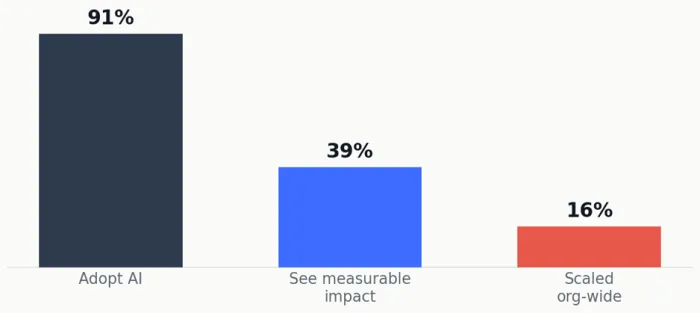
Sources: McKinsey State of AI; IBM Institute for Business Value. Estimates vary by survey.
How fast usage is climbing
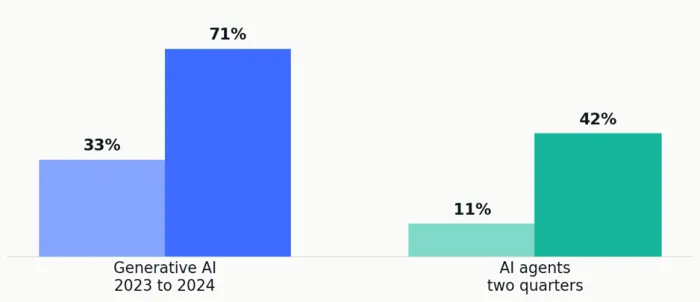
Generative AI uptake roughly doubled in a year; AI agent uptake quadrupled in two quarters.
Where the value actually lands
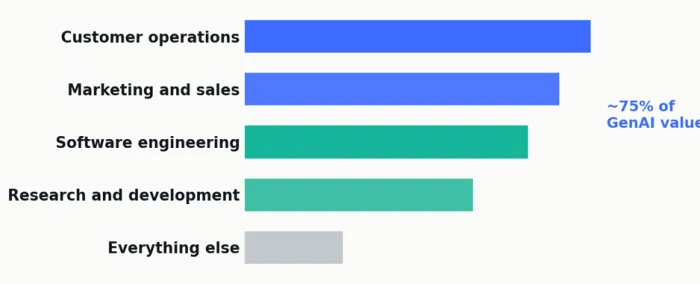
McKinsey estimates about 75% of generative AI value concentrates in four functions. Start your search where the value is.
STEP 2 · THE FIT TEST
Run every option through these seven checks
Score each candidate on the same seven points using your own data and policies, not the vendor’s demo. The weights are a starting template; raise or lower them to match your risk and goals.
| 1 | Problem fit Does it solve one defined, high-friction workflow with a success metric you can measure? If you cannot name the problem, you are not ready to pick a tool. | SUGGESTED WEIGHT High |
| 2 | Integration Native connectors to your stack (Microsoft 365 or Workspace, CRM, data warehouse), real APIs and webhooks, and an honest answer for systems that have no API. | SUGGESTED WEIGHT High |
| 3 | Security and compliance Encryption in transit and at rest, least-privilege access, SSO and role-based controls, audit logs, and the right frameworks (SOC 2, HIPAA, GDPR). Crucially: does it preserve your existing permissions when it retrieves data? | SUGGESTED WEIGHT High |
| 4 | Accuracy and explainability Sourced answers with citations, low edit rates on real tasks, and graceful, visible failure rather than confident wrong answers. | SUGGESTED WEIGHT Medium-high |
| 5 | Adoption and experience Does it live where people already work? Tools that force a context switch get abandoned within weeks, no matter how capable they are. | SUGGESTED WEIGHT Medium-high |
| 6 | Governance and control Clear autonomy levels, containment controls (suspend one connector or action at a time), escalation paths, and a named owner accountable for the workflow. | SUGGESTED WEIGHT Medium |
| 7 | Cost to value and scale Pricing tied to a defined outcome, a short time to value, a clean path from pilot to production, and no lock-in that traps you with one vendor. | SUGGESTED WEIGHT Medium |
Run the same real tasks across each finalist, then compare edit rates, user feedback, and governance with security and compliance in the room.
STEP 3 · MATCH YOUR SITUATION
From profile to pick, in one line
The letters refer to the five categories above. Use this to shortlist, then run the finalists through the fit test.
You want broad productivity gains fast A small or mid-size team wants help drafting, summarizing, and analyzing across many tasks, without a big rollout. → Start with A, or B if you live in one suite | You are all-in on one suite Your work already happens in Microsoft 365 or Google Workspace and you want help in the flow, not in a separate window. → Category B, embedded copilots |
Your knowledge is scattered A larger org keeps answers spread across many SaaS apps, wikis, and drives, and people waste time hunting for them. → Category C, enterprise knowledge assistant | You drown in customer inquiries High inbound volume with repeatable questions is overwhelming your support team and stretching response times. → Category D, service assistant |
You have one heavy function A single area such as engineering, sales, or claims has high, repetitive volume where a specialist tool can pay off quickly. → Category E, vertical agent | You are in a regulated industry Health, finance, or the public sector, where audit trails, data residency, and access control outrank raw capability. → Weight checks 3 and 6 highest, start narrow |
STEP 4 · SPOT THE TRAPS
Red flags in the sales process
None of these are dealbreakers on their own, but two or three together usually mean a stalled deployment ahead.
| ✗ The demo runs on the vendor’s data. Insist on a time-boxed pilot using your own content, users, and policies before any commitment. | ✗ No clear answer on permissions. If they cannot explain how existing access controls survive when the assistant retrieves data, walk. |
| ✗ Pricing tied to nothing. Cost should map to a defined outcome. Per-seat fees with no use case behind them rarely produce ROI. | ✗ It lives outside your tools. If staff must leave their daily apps to use it, plan for low adoption regardless of quality. |
| ✗ No containment or incident plan. Ask for runbooks, scoped shutoffs, and a postmortem commitment, especially once the tool can take actions. | ✗ Total lock-in. Deep proprietary ties with no export or orchestration layer limit your options as the field keeps moving. |
STEP 5 · PROVE IT, THEN SCALE
A 30, 60, 90 day rollout
The safest path is usually the fastest one to value: start with a single workflow, measure honestly, and expand only on evidence.
Days 0 to 30 Pilot one workflow ▪ Pick one high-friction, high-volume workflow ▪ Define success metrics and capture a baseline ▪ Bring in IT and security at the evaluation stage ▪ Run a time-boxed pilot with real users and real data | Days 31 to 60 Measure honestly ▪ Track edit rates, time saved, and resolution rates ▪ Gather candid feedback from the people using it ▪ Tighten permissions, governance, and ownership ▪ Make a clear go or no-go call against the baseline | Days 61 to 90 Scale on evidence ▪ Extend to adjacent workflows that share the win ▪ Add connectors and formalize a governance policy ▪ Assign owners and a review cadence ▪ Report ROI in business terms, not usage counts |
THE TAKEAWAY
Pick the assistant that fits the job, connects to your systems, protects your data, and earns its keep on one workflow first. The rest follows.
The market will keep adding capability and noise in equal measure. Your advantage is not chasing the most advanced model. It is a repeatable way to choose: name the problem, know the category, run the fit test, match your situation, avoid the traps, and prove value before you scale. Do that, and you land in the minority that turns adoption into real returns.