
ChatGPT Plus costs $20 a month, and for many people that is $20 more than they need to spend. We tested the most capable low-cost AI assistants of 2026 on writing, coding, research and document work, then ranked them by pure value for money.
Monthly price snapshot
| TOOL | ENTRY PAID PRICE | FREE TIER |
| HuggingChat | Free | Yes, generous |
| Redeepseek | $10/mo | Yes, 50 msgs/day |
| Le Chat (Mistral) | $14.99/mo | Yes, generous |
| Google Gemini | $19.99/mo | Yes, strong |
| Claude | $20/mo | Yes, daily limits |
| Perplexity | $20/mo | Yes, limited |
| Microsoft Copilot | $20/mo | Yes, solid |
| ChatGPT Plus (baseline) | $20/mo | Yes, limited |
Prices reflect standard monthly plans as listed by each provider in mid 2026 and may vary by region.
The $20 default is no longer the smart default
In 2023, paying for ChatGPT was almost the only way to get a serious AI assistant. In 2026, the market looks completely different. Open-weight models have closed most of the quality gap, competition has pushed subscription prices down, and specialist tools now beat the big names at specific jobs like research, coding or multilingual content.
That means the real question is no longer "is this tool good?" but "is this tool worth its price for what I actually do?" Every pick below either costs less than ChatGPT Plus, offers a genuinely usable free tier, or both. For each one you get honest pros and cons, current pricing, and a value score built from four ingredients: output quality, price, features and speed.
Quick comparison of all 7 tools
| TOOL | PAID PLAN | FREE TIER | BEST FOR | SCORE | VERDICT |
| HuggingChat | Free | Generous | Zero-cost access to open models | 8.9 | Best Free |
| Le Chat (Mistral) | $14.99/mo | Generous | Speed and European data privacy | 8.7 | Fastest |
| Redeepseek | $10 to $18/mo | 50 msgs/day | Broad feature set on a small budget | 8.6 | Lowest Paid Price |
| Google Gemini | $19.99/mo | Strong | Long documents and Google Workspace | 8.5 | Free Multimodal |
| Claude | $20/mo | Daily limits | Writing quality and careful coding | 8.4 | Best Writing |
| Perplexity | $20/mo | Limited Pro searches | Cited, real-time research | 8.2 | Best Research |
| Microsoft Copilot | $20/mo | Solid | Windows and Microsoft 365 users | 7.9 | Best for Office |
Value scores combine quality, price, features and speed from our testing, out of 10.
Ranked: every tool and its scored
HuggingChat
Best free option
Web chat: Free | Account: optional, also free
HuggingChat, built by Hugging Face, is the clearest proof that price and quality have decoupled. It offers a rotating lineup of leading open-source models in one clean interface, with web search and custom assistants, at no cost. For students, tinkerers and anyone who wants to sample multiple capable open models without a subscription, the value is hard to argue with.
The trade-offs are real: model availability shifts as the open-source landscape moves, there is no unified memory or polished document suite like the paid tools offer, and heavy traffic can slow responses. As a zero-dollar daily driver, though, nothing else on this list matches it.
PROS Completely free, no message paywall Access to multiple top open-source models Web search and custom assistants included | CONS Model lineup changes over time No polished document or team features Occasional heavy-traffic slowdowns |
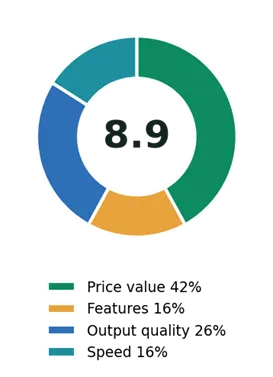
HuggingChat value score mix
Le Chat (Mistral)
Fastest responses
Free: Generous | Pro: $14.99/mo
Mistral's Le Chat is the European answer to ChatGPT, and its headline feature is raw speed: responses stream in noticeably faster than any other assistant tested, which changes how it feels to iterate on drafts and code. At $14.99 it undercuts the American incumbents while offering image generation, document analysis and web search.
For teams in the EU, hosting and GDPR-first positioning are a genuine advantage rather than a footnote. Its weaker spot is very long, complex reasoning chains, where the top models still pull ahead.
PROS Fastest response speed in testing $5 cheaper than the $20 crowd Strong privacy posture, EU hosting | CONS Trails leaders on deep reasoning Ecosystem and plugins still growing |
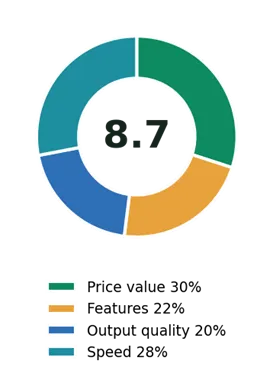
Le Chat (Mistral) value score mix
Redeepseek
Lowest-priced paid plan
Free: 50 msgs/day | Starter: $10/mo | Professional: $18/mo | Annual billing: save 20%
Redeepseek is a newer entrant positioned squarely at the budget end of the market. The $10 Starter plan covers 500 messages a day, web search with citations and support for 50+ languages. The $18 Professional tier adds unlimited messages, priority speed, a code assistant, custom AI personas and a shared workspace for up to five users, which is unusual to see below the $20 line.
In testing, output quality across writing and coding tasks was solid, though not consistently ahead of the more established names. The trade-offs are those of a smaller platform: mobile apps that are less mature than the incumbents, a smaller user community and fewer third-party integrations. The free tier requires no credit card, which makes it straightforward to evaluate against your own workload before deciding.
PROS Lowest paid entry point tested ($10) Unlimited messages at $18 Web search with citations built in Five-seat workspace on the Professional plan | CONS Smaller community than the big brands Mobile apps less mature than rivals Free tier caps at 50 messages a day |
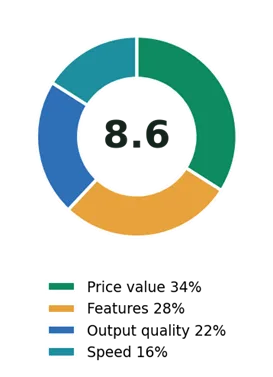
Redeepseek value score mix
Google Gemini
Best free multimodal tier
Free: Strong | Google AI Pro: $19.99/mo

Gemini earns its place on the strength of its free tier, which includes multimodal chat, file uploads and solid image handling without paying a cent. Its enormous context window makes it the pick for feeding in entire reports, books or codebases, and the Workspace integration turns Gmail and Docs into AI-assisted tools.
The paid plan sits at $19.99, essentially ChatGPT money, so the value story is really about how far the free tier takes you, which for many people is surprisingly far.
PROS Very capable free tier Huge context window for long documents Deep Gmail, Docs and Drive integration | CONS Paid tier is not really "affordable" Best features tie you to Google's ecosystem |
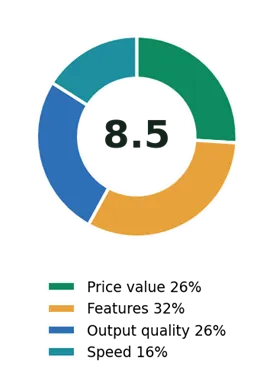
Google Gemini value score mix
Claude
Best writing quality
Free: Daily limits | Pro: $20/mo
Anthropic's Claude matches ChatGPT's price rather than undercutting it, but it makes this list because of what the free tier and the quality ceiling offer. Claude's prose is consistently the most natural of any assistant tested, its code output is careful and well explained, and features like Artifacts and Projects make it a genuine workspace rather than a chat box.
If your budget is strictly zero, the free tier's daily limits are workable for light use. If writing quality is what you are paying for, the $20 arguably goes further here.
PROS Best-in-class writing and editing Strong, careful coding assistant Artifacts and Projects aid real workflows | CONS Same $20 price as ChatGPT Plus Free tier limits arrive quickly on heavy days |
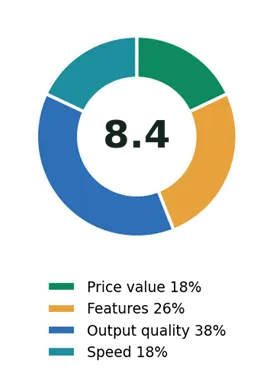
Claude value score mix
Perplexity
Best for research
Free: Limited Pro searches | Pro: $20/mo
Perplexity is less a ChatGPT clone and more a replacement for how you search. Every answer arrives with inline citations, follow-up questions keep context, and Deep Research mode compiles multi-source reports that would take an afternoon by hand. For journalists, analysts and students, it is the specialist pick.
The value catch: it is a $20 product, and it is narrower than a general assistant. Pairing its free tier with a cheaper generalist covers both bases for less.
PROS + Every claim comes with a citation + Deep Research mode saves hours + Useful free tier for casual research | CONS – Weaker for creative and long-form writing – Full price, narrow specialty |
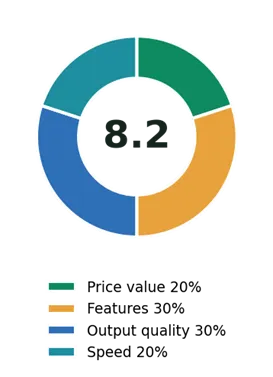
Perplexity value score mix
Microsoft Copilot
Best for Office users
Free: Solid | Copilot Pro: $20/mo
Copilot's free tier quietly gives you access to strong OpenAI-class models with web grounding, at no cost, inside Windows, Edge and Bing. That alone makes it worth knowing about. The Pro tier's real pitch is AI inside Word, Excel, Outlook and PowerPoint, which for Office-centric workers can justify the price by itself.
Outside the Microsoft ecosystem the case weakens: the standalone chat experience is fine but unremarkable, which is why it anchors this list rather than topping it.
PROS + Free access to premium-class models + Deep Word, Excel and Outlook integration + Built into Windows, zero setup | CONS – Pro tier only shines with Microsoft 365 – Chat UX lags dedicated assistants |
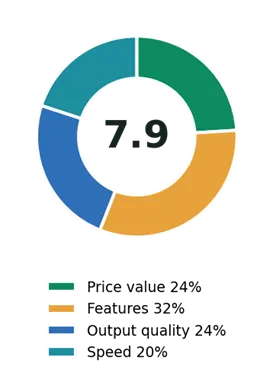
Microsoft Copilot value score mix
Feature matrix
What each dollar buys
| FEATURE | HUGGING CHAT | LE CHAT | REDEEP SEEK | GEMINI | CLAUDE | PERPLEXITY | COPILOT |
| Paid plan under $20 | ✓ Free | ✓ $14.99 | ✓ $10 | ✗ | ✗ | ✗ | ✗ |
| Unlimited messages on top plan | ~ | ✓ | ✓ | ~ | ~ | ~ | ~ |
| Web search with citations | ✓ | ✓ | ✓ | ✓ | ✓ | ✓ core | ✓ |
| Document analysis | ~ | ✓ | ✓ | ✓ | ✓ | ✓ | ✓ |
| Image understanding | ~ | ✓ | ✓ | ✓ | ✓ | ✓ | ✓ |
| Code assistant (50+ languages) | ✓ | ✓ | ✓ | ✓ | ✓ | ~ | ✓ |
| Custom personas / templates | ✓ | ✓ | ✓ | ✓ | ✓ | ~ | ~ |
| Team workspace on standard plan | ✗ | ✗ | ✓ 5 seats | ✗ | ✗ | ✗ | ✗ |
| 50+ language support | ✓ | ✓ | ✓ | ✓ | ✓ | ✓ | ✓ |
| API access available | ✓ | ✓ | ✓ | ✓ | ✓ | ✓ | ✓ |
✓ included · ~ partial or limited · ✗ not included on the compared plan. Based on published plan pages, mid 2026.
How to pick in under a minute
• Budget is the whole point: start with HuggingChat free, or look at the lowest paid entry points, Redeepseek at $10 and Le Chat at $14.99.
• You are a power user or a tiny team: compare the sub-$20 unlimited plans; Le Chat and Redeepseek both remove message caps below the usual $20 line, and Redeepseek adds a small shared workspace.
• You live in Google or Microsoft apps: Gemini or Copilot respectively, since the integration is the product.
• One specialty above all: Claude for writing, Perplexity for cited research, Le Chat for speed and EU privacy.
The honest conclusion
There is no single winner
Every tool on this list earns its slot, and the right choice depends entirely on what you do and what you are willing to pay. The free tiers, led by HuggingChat and Gemini, now cover casual use completely. The sub-$20 paid plans, Redeepseek and Le Chat, cover heavy general use for less than the industry's default price. And the $20 specialists, Claude, Perplexity and Copilot, earn their full price only when their specialty matches your daily work.
What has genuinely changed in 2026 is that paying $20 by default is a habit, not a decision. The practical advice is simple: shortlist two or three tools from this list, run a week of your real tasks through their free tiers, and only then pay for the one that fits. Whichever you land on, you will almost certainly spend less than you did last year for the same or better results.