Most pricing pages are built to be skimmed. You glance at three columns, notice which one is stamped "Most Popular," and reach for your card. That works right up until the moment you hit a wall you didn't know was there: a daily message cap, a history window that doesn't reach back as far as you assumed, an early-termination fee tucked into a policy page you never opened.
This is the version of RedeepSeek's pricing written for people who'd rather see all of that up front: every tier, every ceiling, the math behind the discounts, and the details that live in the fine print instead of the pricing table. By the end you'll know what each plan costs and where each one stops, plus which wall you're most likely to reach first.
| Plan | Price | Daily messages | What it turns on |
| Free Trial | $0 | 50 | Basic content generation, one conversation thread, community support |
| Starter | $10/mo | 500 | Web search, content suite, 50+ languages, email support, 15-day history |
| Professional | $18/mo | Advertised as unlimited | Cited web search, document + image analysis, code assistant, custom personas, 50-day history, 5-person workspace, priority support |
| Custom/API | Quoted | Custom limits | REST API, SSO/SAML, dedicated infrastructure, fine-tuning, on-premise option, 99.9% uptime SLA |
Annual billing takes 20% off Starter and Professional. Pricing verified: August 17, 2026. Prices and features may change, so check the current pricing page before deciding.
Four tiers, and what the number on each one actually maps to
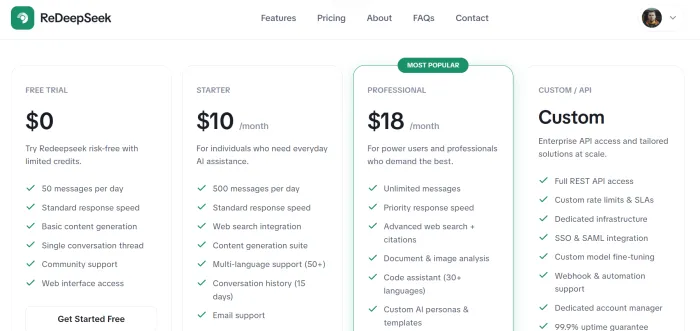
RedeepSeek runs on four tiers: a $0 Free Trial, a $10-per-month Starter, an $18-per-month Professional (the one flagged as most popular), and a Custom/API plan that's quoted individually rather than listed. On the surface, that's a textbook freemium ladder.
What makes it worth reading closely is that the tiers aren't separated by a single dial. As you climb, you're not simply buying "more messages." Each step changes three things at the same time: how many messages you can send in a day, how quickly they come back, and which capabilities switch on at all. Web search, document analysis, image understanding, and API access aren't add-ons you can buy à la carte — they're gated behind specific tiers.
That bundling changes how you should think about upgrading. The distance between Starter and Professional isn't $8. It's $8 in exchange for erasing the message ceiling and turning on document analysis, image understanding, cited web results, custom personas, a shared team space, and a longer memory. Whether that reads as a bargain or an overpay depends entirely on which of those you'd actually touch. That question, not the sticker price, is the one this breakdown keeps circling back to.
One thing is consistent across all four tiers: every plan is listed with SSL encryption and GDPR compliance, plus around-the-clock monitoring. Security, at least, isn't something you're upsold on.
What $0 buys you, and the ceiling you'll bump into first
The Free Trial costs nothing and gives you a daily allowance of 50 messages, at standard response speed, with basic content generation, a single conversation thread, community support, and access through the web interface. No credit card is required to start, and the signup pitch promises you're working within seconds.
Here's the first thing worth sitting with: the 50 is quoted as a daily allowance rather than a one-time pool of credits. If it does renew each day, the arithmetic lands at roughly 1,500 messages a month at no cost. Measured against a lot of competing "free" tiers, many of which meter you down to a handful of prompts before the paywall drops, that's a comfortable amount of room for casual, everyday use.
If you're asking a few questions a day or drafting the occasional email, you may never feel the edge of it.
There's a naming friction worth flagging, and it's the reason for the hedge above. The tier is labeled a "Free Trial" with "limited credits," which reads as time-boxed, while the allowance is quoted per day with no stated expiry. Those two framings point in different directions and nothing published reconciles them. So don't assume this is a permanent free plan, and don't assume it disappears in two weeks either. Confirm the intended behavior at signup before you build a habit around it.
Where the free tier stops is just as important as where it's generous. Three things are missing that you'll notice the moment you need them. There's no web search, so answers come from the model rather than live, cited sources. You're held to a single conversation thread, so parallel projects share one continuous history. And support is community-only, with no direct line to email. The 50-message wall is the ceiling everyone talks about, but for a lot of users the first real limitation is the absence of web search, not the message count.
The $10 Starter tier and where its 500-message wall sits
Starter lists at $10 per month and reframes the free experience in three meaningful ways. The daily allowance jumps from 50 messages to 500, a tenfold increase. Web search integration switches on. And you move from community support to email support.
That 10x lift is the headline, and it's a real one. For $10, you go from roughly 1,500 messages a month to a ceiling near 15,000 if you ever maxed it every day. Unless your usage is unusually heavy, the cap is less a budget you spend down and more a wall you're unlikely to touch. Even on an occasional heavy day (a long research session, a batch of drafts), 500 daily is headroom rather than a constraint you'll feel.
Starter also bundles the content generation suite and multi-language support across 50-plus languages, positioning it as the everyday tier for individuals who want the assistant to be genuinely useful rather than a limited demo.
The catch on this tier is quieter, and it's about memory. Starter lists conversation history at 15 days. What isn't published is what happens to threads past that window: deleted, archived, or simply no longer surfaced. Don't count on reaching a conversation from last month. Anything you'll want to reference weeks later is worth exporting or copying out while it's still inside the window. If your work is transactional — ask, get an answer, move on — that's a non-issue. If you treat the assistant as a running notebook you return to, the 15-day horizon is the detail that will bite you, and it isn't the sort of thing you notice until the day you go looking.
What Starter still doesn't include is the reason many people keep climbing: no document or image analysis, no cited web results, no custom personas, and no team features. Web search is present, but it's the standard version rather than the citation-backed one.
Starter is the "the assistant works for me, personally, most days" plan. It stops precisely where "I need it to read my files" begins.
Professional is positioned as the Most Popular plan
Professional lists at $18 per month and carries the most-popular flag, which the feature list goes a long way toward explaining. This is where the message cap disappears entirely, billed as unlimited, and where the response speed shifts from standard to priority. It's also the point at which the capability set stops being a subset and becomes the full toolkit.
The unlock list is long. Advanced web search with citations. Document and image analysis. A code assistant spanning a wide range of programming languages. Custom AI personas and templates. Conversation history stretched from Starter's 15 days out to 50. A team workspace for up to five people. And priority support ahead of the email-only queue.
The strategic point about Professional has little to do with the removed message cap. Starter's 500-a-day ceiling is already high enough that ordinary use won't reach it. The value is that a single $8 step over Starter turns on every gated feature at once. That reframes the upgrade decision. You don't need to be a power user drowning in messages to justify it. You just need to need one thing on the Professional-only list. If you ever want the assistant to read a PDF, analyze a screenshot, hand you sources you can verify, or hold a project's history for closer to two months, the whole suite arrives for the price of a sandwich a month over Starter. The low incremental cost is doing more work in this decision than the "unlimited" headline is.
Two caveats deserve daylight. First, the site advertises unlimited messages but doesn't publish a numerical fair-use limit, so what the word covers in practice isn't documented anywhere you can check. Second, the team workspace supports "up to 5," but the page doesn't say whether that's five seats included in the single $18 or five seats billed separately. For an individual it's moot; for a small team budgeting around it, that's a question worth resolving with the vendor before assuming one price covers the group. Teams of ten or more are handled through sales directly, so five seats is the ceiling of the self-serve story.
The Custom/API tier, priced by conversation rather than by menu
The fourth tier drops the menu entirely. Custom/API carries no listed price because it isn't meant to. This is the enterprise and developer track, quoted per situation.
The feature list reads like an infrastructure checklist rather than a consumer upgrade. Full REST API access. Custom rate limits and SLAs. Dedicated infrastructure. SSO and SAML for identity management. Custom model fine-tuning. Webhook and automation support. A dedicated account manager. A 99.9% uptime guarantee. And, notably, an on-premise deployment option for organizations that can't or won't send data to someone else's cloud.
The through-line here is that this tier is a different product wearing the same brand, not a bigger version of Professional. Professional is something you buy with a card and start using in minutes. Custom/API is something you negotiate, where the price reflects your call volume and compliance requirements, along with how much dedicated capacity you need carved out. If your interest is embedding the assistant inside your own application, wiring it into internal automation, or meeting security requirements that demand single sign-on or on-prem hosting, this is the only tier that addresses those needs. The "custom" label means the number attached to it is a conversation, not a checkout. Its fees also run on individual service agreements rather than the standard refund policy, a distinction that matters for the fine print below.
The 20% almost nobody calculates: monthly versus annual
Every paid tier can be billed annually, and annual billing saves 20% against paying month to month. The percentage is easy to gloss over, so here's what it actually converts to in dollars.
On Starter, monthly billing runs $10 times twelve, or $120 across a year. The annual plan is $96, which works out to an effective $8 per month. That's $24 saved over twelve months.
On Professional, monthly billing is $18 times twelve, or $216 a year. The annual plan is $172.80, an effective $14.40 per month, saving $43.20 over the year.
The useful way to read those numbers is the break-even, not the percentage. On either tier, the 20% discount effectively hands you a bit more than two months free for paying up front. If you're confident you'll still be using the assistant a few months out, the annual commitment has already paid for itself against going month to month. The discount isn't dramatic in absolute dollars, but for a tool you expect to keep, skipping it means paying roughly twelve months' price for ten months of value.
The reason to not prepay annually is the flip side, and it lives in the refund terms rather than the pricing table.
The fine print that isn't printed on the pricing page
The pricing page's own promise is "no hidden fees, no long-term contracts." That's broadly fair, but "every hidden detail" means reading past the pricing page and into the refund policy, the FAQ, the security notes. Several things there will shape your decision, and none of them appear in the three-column table.
The refund window depends on how you paid. New subscribers to either paid plan get a 7-day, no-questions-asked money-back guarantee. But that guarantee applies only to first-time subscribers, and only to the first billing cycle. It's not a recurring safety net you can invoke every renewal. Annual buyers get a longer initial window: a full refund within 14 days rather than 7.
Annual plans carry a 15% early-termination fee. This is the detail most worth knowing before you prepay. After the 14-day full-refund window closes, an annual subscriber can still request a pro-rated refund for the unused full months remaining, but it comes minus a 15% early-termination fee. Put concretely: prepay Professional's $172.80 annual plan, then leave halfway through, and you're refunded for the unused months with that 15% shaved off the top before the money comes back. It's a fair-enough policy, but it's a real cost attached to the annual discount that the pricing page's savings pitch doesn't mention. The 20% you save by prepaying is only fully yours if you actually stay.
Monthly plans don't pro-rate at all. Cancel a monthly subscription after the 7-day window and access simply continues to the end of the period you already paid for. No partial refund for the unused remainder. Cancellation is self-serve from account settings and takes effect at cycle's end, so you're never locked in, but you also won't see money back for a month you cut short.
Some things are explicitly non-refundable. Refunds aren't available for accounts terminated over terms-of-service violations, for Custom/API fees (which run on their own service agreements), for usage already consumed under the free trial, or for third-party services and add-ons purchased through the platform. Refunds, when granted, are processed within three to five business days back to the original payment method.
There's a chargeback clause with teeth. If you spot an unexpected charge, the policy asks you to contact billing before disputing it with your bank, and warns that chargebacks filed without that prior contact may lead to account suspension. The right first move for any billing surprise is an email, not a bank dispute.
Your conversation history has a stated limit. This hides in plain sight in the plan features but behaves like fine print: history is listed as 15 days on Starter and 50 on Professional. What isn't stated is what happens past that window, whether older threads are removed or just no longer reachable. Export anything with long-term reference value rather than assuming it'll still be there. It's a limit you don't feel until the day you go looking.
"Message" is never defined. Both paid tiers quote message limits (500 a day on Starter, unlimited on Professional), but there's no published definition of what counts as one. Whether a long document analysis or a lengthy back-and-forth registers as one message or several isn't spelled out. Academic for most users, but if you're planning around the 500-a-day cap specifically, it's a variable worth clarifying rather than assuming.
The site currently gives two different figures for code-language coverage: 30+ on the feature description and 50+ on the Professional pricing card. If programming-language coverage is important to your use case, confirm the current figure before subscribing.
On privacy, the strongest claims are the hardest to source. What the plans themselves list is SSL encryption and GDPR compliance. Beyond that, claims circulate about end-to-end encryption, SOC 2 compliance, conversations not being used to train the models, and deleting your data on demand. None of it could be confirmed in RedeepSeek's own published documentation for this piece. For many buyers those points are more decision-relevant than the gap between tiers, which is exactly why they're worth asking for in writing rather than taking on trust.
Reading the tiers by the numbers, not the labels
Strip away the feature copy and look at what a message costs on each paid tier, and the shape of the pricing gets clearer.
At its cap, Starter's $10 covers up to roughly 15,000 messages a month, a fraction of a cent each if you maxed it out. But since few users come close to 500 a day, the honest per-message cost tracks your real usage. At around 50 messages a day, about 1,500 a month, Starter works out to roughly two-thirds of a cent per message. The same volume on the free tier costs nothing, which is exactly why the free tier is such a reasonable landing spot for light users: at 50 a day, you're using precisely what it hands out.
The more revealing number, though, is the cost of removing limits. Going from free to Starter is $10 to lift your daily ceiling tenfold and add web search. Going from Starter to Professional is $8 more to erase the ceiling entirely and switch on the full feature set. That second step has the far better ratio: less money for more unlocked. That may well be part of why Professional carries the Most Popular flag. The break-even has nothing to do with message math. $8 is a low enough bar that needing any one Professional feature justifies the jump.
Which plan is actually yours
Here's the decision reduced to the questions that actually move it.
Stay on the Free Trial if your use is genuinely light (a handful of questions and drafts a day) and you don't need live web results, more than one running thread, or a direct support channel. Fifty messages a day is real room, and for a lot of people it's simply enough. That holds only if the allowance keeps renewing, which is the one thing to confirm before you settle in. The moment you find yourself wanting cited answers or juggling separate projects in one thread, that's the signal to move.
Choose Starter at $10 when the assistant has become a most-days habit and you want two specific things the free tier withholds: a daily ceiling high enough to forget about, and web search. It's the right fit for an individual whose work is largely ask-and-answer, who doesn't need to feed it files, and who won't miss threads older than two weeks. Prepay annually only if you're confident you'll still be here in a few months. The effective $8-a-month rate rewards staying and the annual terms penalize leaving early.
Move to Professional at $18 the instant you need any single thing on its list: reading documents, analyzing images, sources you can verify, custom personas, a fifty-day history window, priority speed, or a small shared workspace. Don't treat it as a power-user tier gated behind heavy message volume; it's an $8 step that turns everything on at once, and needing one feature is enough to justify it. If a team is sharing it, settle the "up to five seats" billing question with the vendor first.
Go to Custom/API only when you've outgrown the idea of a chat window entirely: when you're embedding the assistant in your own product, wiring it into automations, or answering to security requirements like single sign-on or on-premise hosting. It's not a bigger subscription; it's a negotiated relationship, and the absence of a listed price is the point.