The short version
If your needs end at clean grammar, tighter sentences and the odd rephrase, the free plan is a finished product rather than a trial. Everyday proofreading never touches the 100 monthly AI prompts, so the allowance goes further than the number implies. The moment you reach for the heavier features, checking whether text reads as machine-written, making it read as human, scanning for plagiarism or accepting the confidence rewrites, Grammarly stops and asks for Pro. That costs $12 a month on an annual plan or $30 month to month, and in some countries the same tier is labelled Plus at checkout. |
What follows is how I found that out, tool by tool.
Twelve tools, three price tags
The 2025 redesign turned the side rail of the editor into a set of separate assistants that all open in the same panel. Grammarly describes the full line-up on its AI agents page. Rather than list them in the order they appear, here they are grouped by what happens when a free user clicks.
Runs free with no metering (two tools)
| Grammarly | The original checker. Live corrections for spelling, grammar, punctuation, clarity, tone and word choice in any document you open. This has never sat behind a paywall. |
| Authorship | Keeps a record of how a piece was produced, marking what was typed, pasted, edited or generated, so you can show your process. Whether it appears can depend on your school or account type. |
Runs, but every use draws on your 100 monthly prompts (six tools)
| AI Chat | A chat window pinned to the document for questions, quick research and drafting text in place. |
| Paraphraser | Rewrites a selected passage in a chosen register while keeping its meaning. Useful when a paragraph needs to sound more formal, or less, in a hurry. |
| Resume Builder | Structured, role-aware suggestions for CVs. Light help is free; the deeper polish leans on Pro. |
| Reader Reactions | Simulates how a named audience, say a manager or a professor, would respond to the draft, surfacing likely takeaways and unanswered questions. |
| Citation Finder | Looks for public sources that support or contradict a claim and formats them in APA, MLA or Chicago. |
| AI Grader | Estimates the mark a piece would earn against a rubric or instructor notes, then proposes fixes. Built with students in mind. |
These all work on free, but heavy or repeated use burns through the allowance quickly. Pro raises the ceiling to 2,000 prompts per member each month.
Does not run at all on free (four tools)
| AI Detector | Scores how likely a passage is to be AI-generated and returns an authenticity rating. On free it shows a locked pitch screen and nothing else. |
| AI Rewriter | Hunts for the words and phrases language models overuse and swaps in less predictable alternatives. |
| Humanizer | Reworks machine-sounding passages so they read naturally, while trying to preserve your own voice. |
| Plagiarism Checker | Compares your text against web, academic and professional sources and flags close matches. |
Inside one free session
Everything here comes from a single sitting in the browser version on a free account. I uploaded a Word file of roughly 2,970 words and then worked through the rail one icon at a time, so the sequence below is the sequence a new user meets.
A blank dashboard that is already selling
The Docs dashboard is where you land. A small Free badge sits beside the logo, and the left column offers Docs, Version history, Trash, Account and Apps. Before you have opened anything, a green banner suggests installing the desktop app and a second pop-up promotes PDF upload. None of it is pushy, but the nudging starts on an empty screen.
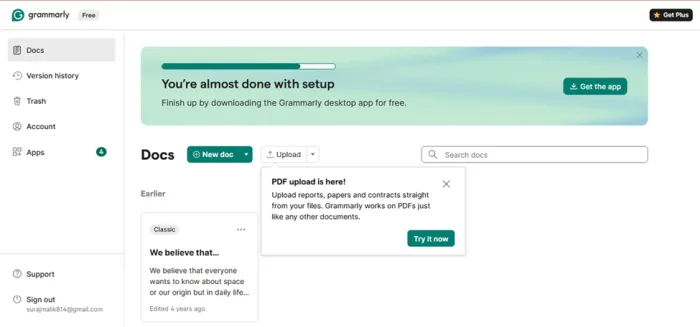
The dashboard on a fresh free account.
The editor and its score
Once the upload finished, the text sat on the left and Grammarly’s panel on the right. The panel opens with an overall score, 92 for my draft, and sorts its suggestions into Grammar, Clarity and Delivery with a live count under each. Two tabs, Proofread and Strengthen writing, sit above. Down the far right edge runs a narrow column of icons; hover it and it unfolds into the full set of twelve tools with labels.
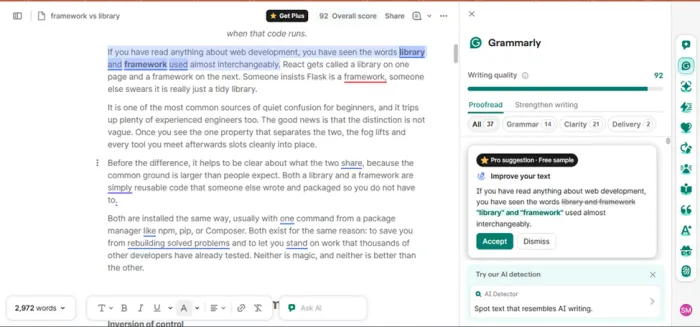
The uploaded draft, scored and sorted into Grammar, Clarity and Delivery.
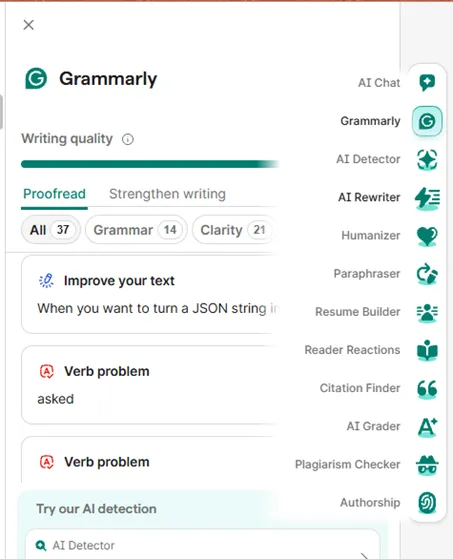
Hover the rail and all twelve tools appear with labels.
One detail gives the game away early. The very first suggestion in my list was tagged as a free sample of a Pro rewrite. You are offered a taste before you reach the wall.
Two kinds of locked door
The AI Detector was the first icon I opened, and it produced no result. In its place came a locked screen with a friendly headline about originality and a list of three things the tool would do for a paying user: detect AI-written text, return an authenticity score, and add citations. Each line carried a padlock, and a Get Plus button sat beneath. On free, this tool describes itself and does nothing more.
The Delivery category, only two items for my draft, behaved differently and ended up in the same place. The suggestion’s headline was readable, a prompt to sound more confident, but the replacement text underneath was blurred until you upgrade. That is the pattern across the paid features: you can see that a useful edit exists, and you cannot read it.
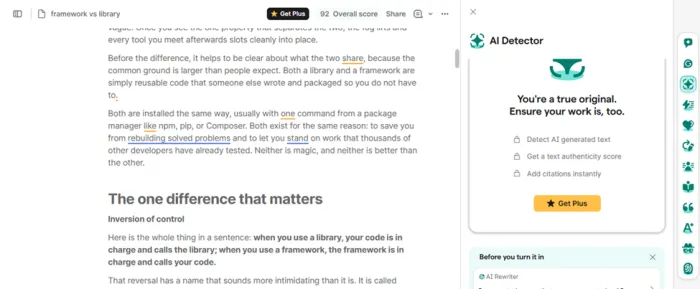
The AI Detector on free: a description of the tool instead of the tool.
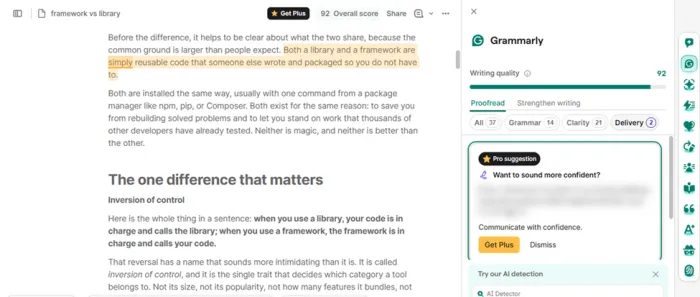
Readable headline, hidden fix.
How the upgrade path is engineered
Three things about the design of the paywall are worth knowing before you decide whether it bothers you.
Preview first, then blur
Free users are never told a feature is unavailable. They are shown its outline, a headline, a category, a count, and then the payoff is obscured. It is effective, and it is a little irritating once you notice it.
Two names for one plan
Grammarly’s plan pages call the paid tier Pro, but the upgrade buttons in a number of regions read Get Plus. They are the same product, so there is no cheaper or fuller version to hunt for.
A parent company with a new name
In late 2025 the company behind the product rebranded as Superhuman. The editor is still called Grammarly and the change has no bearing on what free includes. The Wikipedia entry has the fuller history if you want it.
Free against Pro, line by line
This combines what I hit in the editor with Grammarly’s published plan details, grouped so you can find the row that matters to you.
| Feature | Free | Pro |
|---|---|---|
| Price | $0 | $12 a month billed yearly, or $30 monthly |
| Core writing help | ||
| Grammar, spelling, punctuation | Yes | Yes |
| Clarity and conciseness | Yes | Yes |
| Tone detection | Basic | Full |
| Full sentence and paragraph rewrites | No | Yes |
| Delivery and confidence rewrites | Blurred preview only | Yes |
| AI tools | ||
| AI prompts per month | 100 | 2,000 per member |
| AI Detector and authenticity score | No | Yes |
| Humanizer | No | Yes |
| Plagiarism checker | No | Yes |
| Citation finder | Limited by prompt pool | Yes |
| AI Grader | Limited by prompt pool | Yes |
| Teams and support | ||
| Style guide and brand tone | No | One of each |
| Seats and analytics | No | Up to 149 members |
| Support | Help center | Priority help center |
Limits and prices move. Check Grammarly’s plans page before you buy.
What reviewers say
Across the review sites the writing help itself scores well; the complaints cluster around billing and support. These figures were captured in early 2026 and will drift.
| Where | Score | The recurring theme |
|---|---|---|
| G2 | 4.7 / 5 | Live checking and day-to-day usefulness get the most praise |
| Capterra | 4.7 / 5 | Writing reads more professional; some find it corrects too eagerly |
| Trustpilot | 3.5 / 5 | Grammar help is liked; billing disputes and slow replies drag the score down |
| Apple App Store | 4.6 / 5 | Often described as a tool people would not want to write without |
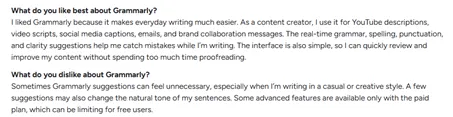 Typical of the positive reviews: everyday usefulness, with a nod to the paywall. | 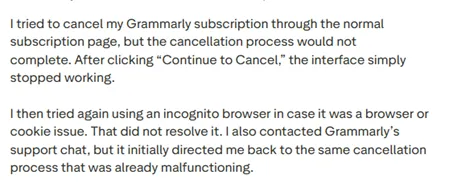 Typical of the negative ones: cancellation and support trouble. |
Five cheaper ways to cover the gaps
Grammarly is the default choice, not the only one. If a particular locked feature is the thing you need, one of these may do that single job for less. Prices are approximate and change often.
ProWritingAid about $10 a month on an annual plan; lifetime licence available; capped free tier
The pick for long-form and fiction. Its style, pacing and repetition reports go deeper than anything in Grammarly’s panel.
LanguageTool from about $4.99 a month on a multi-year plan; solid free tier
Covers more than thirty languages and has a stronger privacy stance. If you write in anything other than English, start here.
QuillBot about $8.33 a month billed yearly; generous free tier
Paraphrasing and summarising on a student budget. Directly replaces the Paraphraser without spending prompts.
Wordtune about $6.99 a month; limited free tier
Sentence-level rewriting and quick tone shifts, closest in spirit to the rewrites Grammarly blurs.
Hemingway Editor free web version; paid plans add extras
Readability scoring and cutting. It does one thing, and it does it without an account.
So who should upgrade?
You write emails, documents and posts and want them clean.
Stay on free. The core checker, document upload and 100 prompts cover this comfortably.
You are a student who leans on grade predictions, citations and originality checks.
Pro is the honest answer. At $12 a month on the annual plan, the detector, plagiarism checker and full rewrites are what you are paying for.
You run a team or need a shared style guide.
Free has no seats, no analytics and no house style. Pro adds one style guide and one brand tone, and larger teams sit on the business tiers above it.
Bottom lineFree plan Worth using. It is a complete proofreader with document upload and enough prompts for occasional AI help, not a crippled demo. Pro at $12 a month Worth it only if you will actually use the detector, humanizer, plagiarism checker or full rewrites most weeks. Take the annual price; $30 month to month is hard to justify. Skip it if You need one locked feature and nothing else. A cheaper specialist above will cover that single job. Grammarly’s free tier is real software, not bait. The catch is simply that the suggestions it blurs tend to be the ones you most want to read, and the editor never lets you forget it. |