AI saves time on repetitive tasks by taking over the pattern work that surrounds your actual job: drafting the same follow-up email for the fortieth time, pulling numbers out of a supplier PDF, reshaping a report for a different audience, translating a page into Spanish. Workplace research puts the realistic gain at four to eight hours a week once the setup is done. This guide shows you where those hours hide, which tasks transfer cleanly to an AI assistant, and how to check afterwards whether anything actually changed.

The Hours You Never Notice Losing
Ask most people where their week went and you get a shrug.
The shrug is honest. Repetitive work never announces itself. Nobody blocks ninety minutes on the calendar for copy-pasting. It arrives in ninety-second increments, four hundred times over, and the cost only becomes visible when somebody sits down and measures it.
Somebody has. Asana's Anatomy of Work Index surveyed more than 10,000 knowledge workers globally and found that the average professional spends roughly 25 percent of their time on the skilled work they were actually hired to do. About 60 percent disappears into what Asana calls "work about work": chasing status updates, hunting for documents, sitting through meetings that could have been a paragraph, switching between tools. McKinsey Global Institute research points the same direction, estimating that employees lose 1.8 hours a day, or 9.3 hours a week, on searching for and gathering information.
A 2022 Harvard Business Review study tracked 137 users across 20 teams at three Fortune 500 companies over five weeks. Those workers toggled between applications and websites roughly 1,200 times a day.
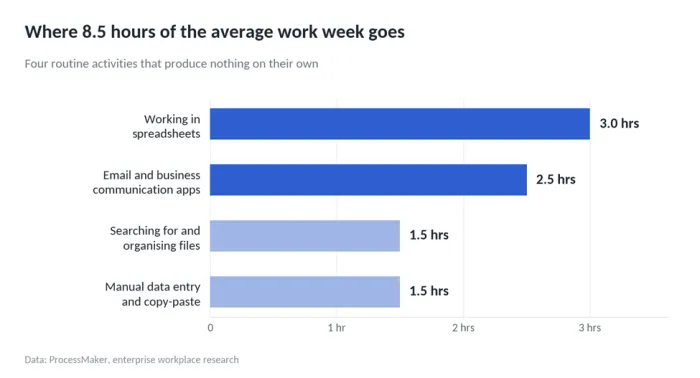
ProcessMaker analysed enterprise workplaces using four million data points and broke the loss into something you can picture:
| Activity | Time per week, average office worker |
|---|---|
| Working in spreadsheets | About 3 hours |
| Email and business communication apps | About 2.5 hours |
| Searching for and organising files | About 1.5 hours |
| Manual data entry and copy-paste | About 1.5 hours |
Eight and a half hours. More than a full working day, spent on four activities that produce nothing by themselves. The same research found the average enterprise employee performs over 1,000 copy-paste actions every week, which adds up to roughly 52,000 a year.
That is the problem. The rest of this guide is about how much of it you can hand over, and how much you should not.
Four Shapes of Repetitive Work
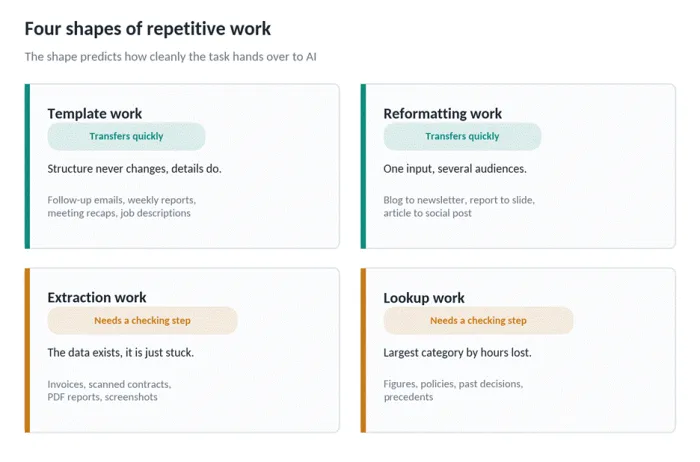
Those eight and a half hours are not one problem. They are four, and each behaves differently the moment you try to automate it.
Template work. The output changes slightly every time, the structure never does. Follow-up emails, weekly reports, meeting recaps, job descriptions.
Extraction work. The information already exists, locked inside an invoice, a scanned contract, a PDF report, a screenshot somebody sent you at 6pm. Your job is to get it out and into a field somewhere else.
Reformatting work. One piece of content, several audiences. A blog post becomes a newsletter. A research summary becomes a slide. Nothing new gets created, everything gets reshaped.
Lookup work. You need a figure, a policy, a past decision, a precedent. The 9.3 hours a week McKinsey identified lives almost entirely here.
This split predicts how well automation will go. Template and reformatting work transfer quickly, because the pattern is stable and a bad output is obvious the second you read it. Extraction and lookup work need a checking step, because a wrong number that looks plausible will sail straight past you and into a client report. The seven tasks below are ordered with that difference in mind, easiest first.
Audit Your Own Week Before You Automate Anything
Industry averages give you a starting point. They are not your numbers.
Before touching a single tool, spend five working days logging what you do in fifteen-minute blocks. It sounds tedious. It costs about ninety seconds a day if you keep a spreadsheet pinned in a browser tab and update it when you switch tasks.
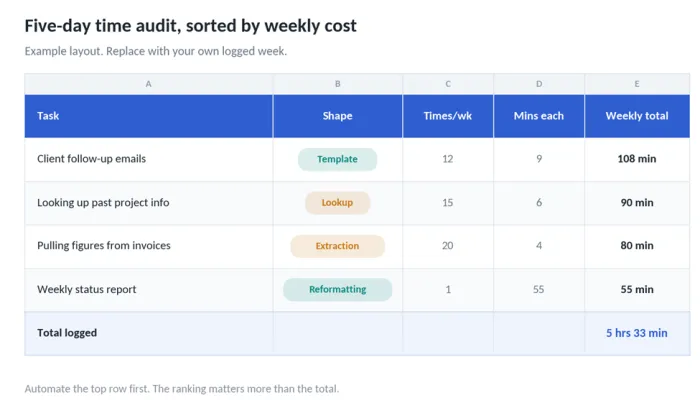
Use the four shapes from the previous section as your categories. At the end of the week, sort by weekly total and look at the top rows. Something like this:
| Task | Shape | Times/week | Minutes each | Weekly total |
|---|---|---|---|---|
| Client follow-up emails | Template | 12 | 9 | 108 min |
| Pulling figures from invoices | Extraction | 20 | 4 | 80 min |
| Looking up past project details | Lookup | 15 | 6 | 90 min |
| Weekly status report | Reformatting | 1 | 55 | 55 min |
That example logs 5 hours and 33 minutes across four line items, and it is a conservative week. The ranking matters more than the total. You want to know which single task costs you the most, because that is the only one you should automate first. The reason comes up again in the setup section further down.
Two things usually surprise people who do this. The first is that the expensive task is rarely the one they complain about. The second is that a nine-minute task done twelve times hurts more than a fifty-five minute task done once, and it hurts in a way that is harder to notice, because it never blocks out a visible chunk of the day.
Seven Tasks Worth Handing Over
Each of these maps back to one of the four shapes. Each one below gives you the manual version and the handover, with a prompt you can copy straight into ReDeepSeek or any capable assistant.
1. The email you have already written forty times
Template work, and the fastest win available to almost anyone. Clockify's research found employees spend 6.42 hours a week checking and responding to email, and a large share of that is composing messages that differ from the last one by a name and a date.
The handover is not "write my emails for me." It is building four or five reusable prompts for the message types you actually repeat, then feeding each one the specifics.
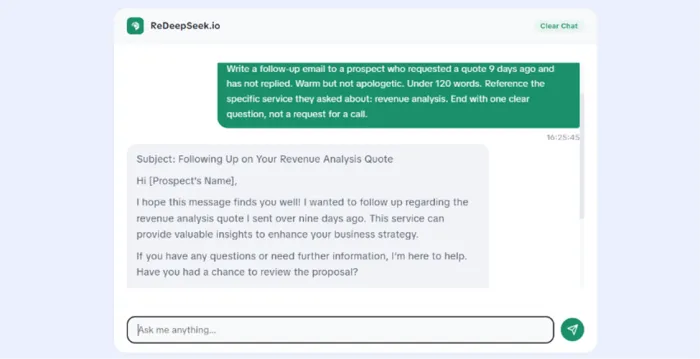
Write a follow-up email to a prospect who requested a quote 9 days ago and has not replied. Warm but not apologetic. Under 120 words. Reference the specific service they asked about: [SERVICE]. End with one clear question, not a request for a call.
Save the prompt. Reuse it. The second run takes eleven seconds.
2. Long documents you need one answer from
You get a 40-page supplier agreement and you need to know the termination notice period. Reading it takes forty minutes. Finding the clause takes four.
Upload the document and ask a specific question rather than asking for a summary. Summaries of long documents are where AI tools are weakest and where mistakes hide most comfortably. Targeted questions produce answers you can verify against a page number in seconds.
From the attached contract, tell me: (1) the termination notice period, (2) any auto-renewal clause, (3) which party pays for early exit, (4) the exact page and clause number for each answer.
That last instruction is the important one. Asking for the citation turns an unverifiable answer into a two-minute check.
3. Numbers trapped in screenshots and invoices
Extraction work, and the source of a large slice of those 1,000 weekly copy-pastes from the first section.
Screenshot the document and upload it, then ask for structured output rather than prose. Requesting a table or CSV means the result drops into a spreadsheet without further handling.
Extract every line item from this invoice image into a markdown table with these columns: description, quantity, unit price, line total. Flag any row where quantity multiplied by unit price does not match the line total.
The second sentence in that prompt does something useful. It asks the model to check its own arithmetic, which catches a meaningful share of extraction errors before you see them. Verify the totals yourself regardless.
4. One piece of content, four formats
Reformatting work. A single research piece has to become a newsletter section, three social posts, an internal summary for the sales team, a slide for Monday. The thinking happened once. The reshaping happens four times.
Paste the original and specify the target format precisely, including length and audience. Vague instructions produce generic output, which is the most common complaint people have about AI writing tools and usually a prompt problem rather than a model problem.
Turn the article below into a LinkedIn post for operations managers. 140 words maximum. Open with the single most surprising statistic. No hashtags. No emoji. End on a question that invites a specific answer rather than agreement.
5. Boilerplate code and the bug you cannot see
This one has the strongest measured evidence behind it. Developers using AI coding assistance have been recorded coding up to 55 percent faster, with teams showing a 26 percent increase in pull request velocity after adoption.
The gains concentrate in two places: scaffolding you have written a hundred times, and errors you have been staring at for twenty minutes. A second reader who has never seen your assumptions finds the missing bracket faster than you do.
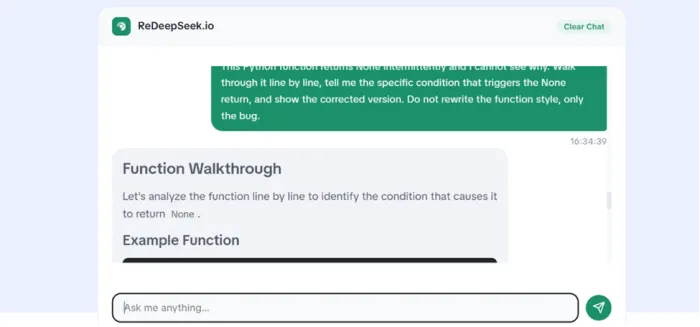
This Python function returns None intermittently and I cannot see why. Walk through it line by line, tell me the specific condition that triggers the None return, and show the corrected version. Do not rewrite the function style, only the bug.
6. Reaching readers who do not speak your language
Translation used to mean a vendor, a quote, a four-day wait. For internal documents, product copy, customer replies and support macros, that overhead now belongs to work that no longer needs it.
Ask for localisation rather than translation. The difference matters commercially: dates, currency, idiom and formality level all shift between markets, and a literal translation reads as one.
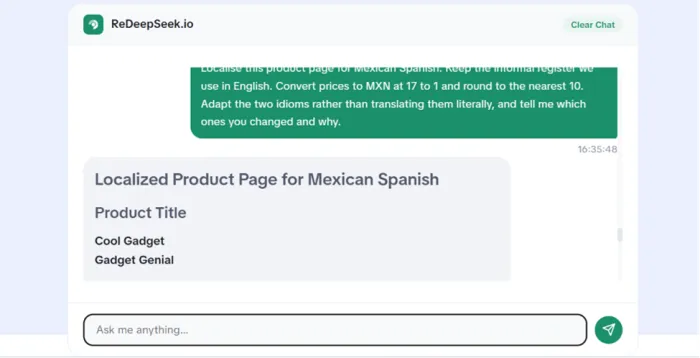
Localise this product page for Mexican Spanish. Keep the informal register we use in English. Convert prices to MXN at 17 to 1 and round to the nearest 10. Adapt the two idioms rather than translating them literally, and tell me which ones you changed and why.
ReDeepSeek supports over 50 languages, which covers most of what a small team needs before a professional linguist becomes worth the cost. Anything legal, medical, contractual or otherwise regulated still goes to a human. More on that boundary shortly.
7. Research where the source matters
Lookup work is the largest category by hours and the riskiest to automate, because a confident wrong answer costs more than no answer.
Research from Qatalog with Cornell University's Ellis Idea Lab surveyed 1,000 knowledge workers across the US and UK and found they lose an average of 59 minutes a day simply locating information scattered across their tools. Recovering that hour is worth doing. Recovering it carelessly is worse than not recovering it.
Two rules make the difference. Ask for sources every time, and open at least one of them. ReDeepSeek's web search returns cited sources for exactly this reason, and the citation is only useful if somebody clicks it.
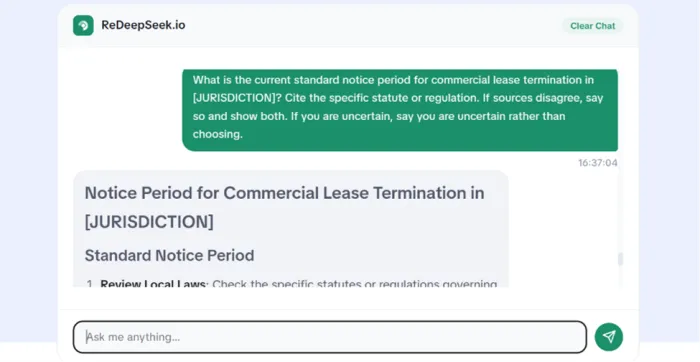
What is the current standard notice period for commercial lease termination in [JURISDICTION]? Cite the specific statute or regulation. If sources disagree, say so and show both. If you are uncertain, say you are uncertain rather than choosing.
The Setup: One Task, Then the Next
Most people who try to automate their week fail in the same way. They adopt six tools in a fortnight, get overwhelmed by the end of the month, quietly abandon all six, and keep paying four subscriptions.
The sequence that works is slower and duller:
1. Take the top row from the audit you ran earlier. One task. Ignore the others.
2. Write one prompt for it. Test it four times on real work, not on made-up examples.
3. Refine the prompt until the output needs light editing rather than rewriting.
4. Save it somewhere you will find it again. A pinned note or a template library, anywhere you can retrieve it in five seconds.
5. Run it for two weeks and log the time it takes now.
6. Only then move to the second task.
There is one condition that decides whether any of this pays off, and it gets missed constantly. AI saves real time only when it removes a step from your process, rather than sitting on top of the process you already had. Generating a draft you then rewrite from scratch, on top of the outline you were going to write anyway, adds a step. Generating a draft that replaces your first draft removes one.
Check which one you are doing before you decide something is working.
What Should Stay With a Human
The seven tasks above are the ones that transfer. This section is the ones that do not, and being honest about the boundary is what keeps the rest of it useful.
• Pricing negotiations. The judgement lives in the relationship history, which the model cannot see.
• Complaint handling. A customer who is angry needs evidence that a person read their message.
• Anything carrying a legal or financial promise to a client.
• The strategic thinking behind your work, as opposed to the writing up of it.
• Final approval on anything going out under your name.
There is a second limit worth stating plainly, because most articles on this topic skip it. AI drafts need editing, and editing costs real time. If your outputs need heavy rewriting every session, the tool is saving you fifteen minutes rather than fifty. That is still a gain. It is not the gain the marketing promised, including ours, and you should measure which one you are getting rather than assuming.
The tasks where the editing burden stays low are the ones with a stable structure and a low cost of being slightly wrong. Look back at the four shapes: that is the same distinction, arriving from a different direction.

Counting What You Actually Saved
The audit from the earlier section has a second use. It is your baseline.
After a fortnight on one automated task, log the same task again and run the subtraction:
(minutes before x frequency) - (minutes after x frequency) - setup time amortised = weekly hours recovered
Setup time counts. A prompt that took you forty minutes to get right and saves eight minutes a week pays for itself in the sixth week, and knowing that number stops you from abandoning something two weeks before it turns positive.
For a benchmark, employees using automation technology have been recorded saving at least 3.6 hours weekly on routine tasks, with 73 percent reporting better work quality and 79 percent reporting higher productivity. Separately, 54 percent of the workforce believes automation could save them more than five hours a week. The gap between what people believe is available and what gets measured is mostly a setup problem, and the sequence in the previous section is how you close it.
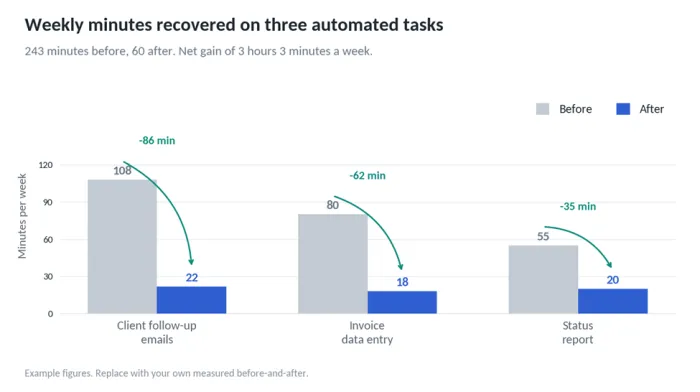
| Task | Before (min/wk) | After (min/wk) | Recovered |
|---|---|---|---|
| Client follow-up emails | 108 | 22 | 86 min |
| Invoice data entry | 80 | 18 | 62 min |
| Status report | 55 | 20 | 35 min |
| Weekly total | 243 | 60 | 3 hrs 3 min |
Fill that table with your own numbers, not this example's. If the recovered column comes out near zero after a month, the honest answer is that the task was a poor candidate, and moving to the next row on your audit beats forcing it.
One Last Thing, From Me
The idea behind ReDeepSeek is simple: take the repetitive work that quietly eats into your week and see whether a tool can handle most of it for you.
But before you sign up for anything, there is a more useful place to start. Open a spreadsheet and track where your time actually goes for five days. Write down the small, repetitive jobs that keep coming back—moving numbers between documents, sorting information, checking the same details, or copying data from one place to another.
The point is not to track every minute perfectly. It is to spot the work that takes more time than it deserves.
Once you have a clear picture, look at the tasks that follow the same steps every time. Ask yourself whether a tool like ReDeepSeek could handle most of the process while you keep the parts that require judgement.
If the answer is yes, pick one task and try it. Start small, see how much time it saves, and decide from there. If the answer is no, you have still gained something valuable: a better understanding of where your working hours are actually going.