If you're job hunting right now, you've probably already opened ChatGPT, Claude, or Gemini to rewrite a bullet point or draft a cover letter. You're not behind. You're in the majority. But here's the truth most "AI job search" articles skip: using AI is now table stakes, and using it badly is one of the fastest ways to get quietly rejected.
This guide won't just hand you ten apps and wish you luck. It shows you where AI genuinely moves the needle and how to use it so your applications rise above the noise instead of blending into it. It also flags what risks to sidestep, from applicant-tracking filters to AI-detection tools that flag good candidates. Everything here is grounded in current data and written from your side of the table. Let's start with the landscape, because the numbers explain why the "right way" to use AI has changed.
The State of Play: AI Is on Both Sides of the Hiring Desk
A few years ago, AI was something job seekers experimented with to make writing a little easier. Today, it's part of the hiring process itself.
Candidates use AI to improve resumes, write cover letters, prepare for interviews, and tailor applications. Employers use AI to sort applications, identify qualified candidates, and reduce the time recruiters spend reviewing resumes. In many cases, your application is evaluated by software before another person ever sees it.
That changes how you should approach your job search.
On the Job Seeker's Side
For many people, AI has become another tool in the job-search toolkit. It can rewrite awkward sentences, make bullet points more impactful, suggest better wording, and help customize a resume for a specific role.
Some candidates also use it to compare their resume against an applicant tracking system (ATS), identify missing keywords, or practice common interview questions.
But there's a big difference between getting help and handing over the entire process.
Using AI to improve your own work is very different from asking it to invent your professional story. The first approach saves time while keeping your experience authentic. The second often produces generic applications that could belong to almost anyone.
That's the difference this guide focuses on.
On the Employer's Side
Recruiters are dealing with more applications than ever. A single job posting can attract hundreds of resumes within days, making it impossible to review every application manually.
To manage that volume, many companies use applicant tracking systems and AI-powered hiring tools. These systems help organize applications, identify relevant skills, and highlight candidates who appear to match the job description.
That doesn't mean humans have disappeared from the hiring process. It simply means software often decides which resumes reach a recruiter's desk first.
As applying for jobs becomes faster, employers rely more heavily on technology to keep up. The result is a hiring process where both sides are using AI-but for very different reasons.
The Opportunity-and the Reality
AI can absolutely make your job search more efficient.
Instead of spending an hour rewriting every resume from scratch, you can tailor it in minutes. You can quickly identify weak bullet points, improve clarity, prepare for interviews, or create a stronger first draft.
What AI can't do is replace genuine experience.
Recruiters still want to understand what you've accomplished, what problems you've solved, and why you're a good fit for the role. Those answers have to come from you.
The candidates who get the most value from AI aren't the ones who let it do all the work. They're the ones who use it to spend more time thinking about strategy and less time staring at a blank page.
The One Principle: Use AI as a Co-Pilot, Not a Ghostwriter
If there's one idea worth remembering, it's this:
Use AI to improve your application-not to create your career story.
Think of AI as an editor sitting beside you. It can make your writing clearer, tighten weak sentences, organize information, and spot things you've overlooked. Those are exactly the kinds of tasks it's good at.
Where people get into trouble is expecting AI to replace their own thinking.
A resume filled with achievements you didn't earn or language that doesn't sound like you usually becomes obvious during interviews. Recruiters don't need AI detectors to notice when an application feels generic or disconnected from the person behind it. After reading dozens-or even hundreds-of resumes, they quickly recognize the same polished phrases appearing again and again.
The strongest applications don't hide the fact that AI was involved. They use AI to communicate real accomplishments more clearly while keeping the candidate's voice intact.
That's the mindset you should carry through every tip in this guide. AI is there to help you present your experience-not create one you don't have.
Where AI actually helps, stage by stage
A job search isn't one task; it's a dozen. AI is excellent at some and dangerous at others. Here's where to deploy it across the journey, with a concrete approach and the pitfall to avoid at each step.
1. Get clear on what you're actually looking for
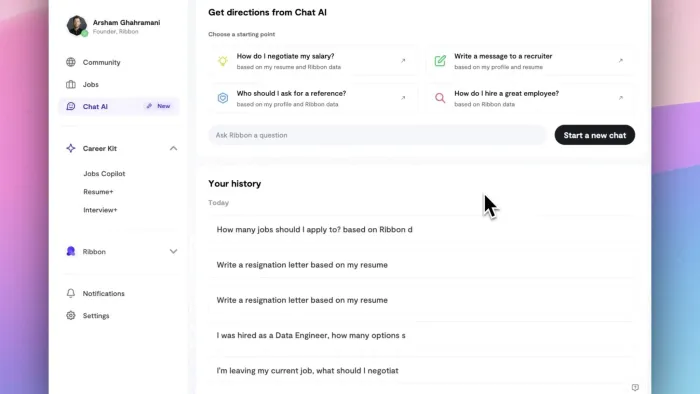
Before you touch a resume, use AI as a thinking partner. Paste in two or three job descriptions you find exciting and ask: "What do these roles have in common? What underlying skills do they reward?" Then flip it: "Based on my background below, which am I a strong fit for, and where are the gaps?" This turns AI into a low-stakes career coach that helps you target a tighter set of roles, which matters because spraying 200 generic applications is exactly what the filters catch.
Pitfall: Don't let AI define your goals. It's great at organizing your thoughts; it has no idea what you'll find meaningful. Use it to clarify, not to decide.
2. Build and tailor your resume for real humans and the ATS
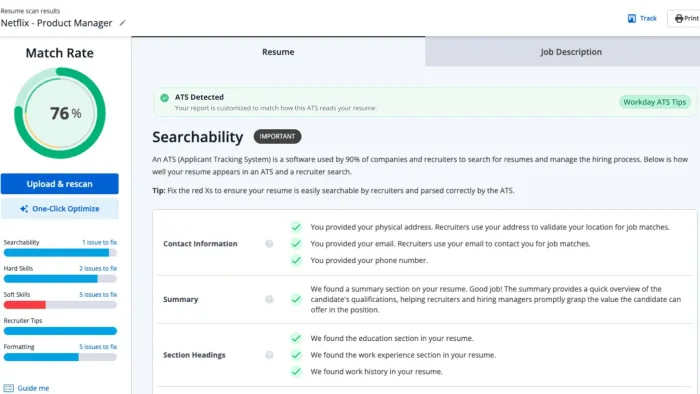
This is AI's home turf. Use it to:
Turn responsibilities into achievements. Give it a plain description and ask it to reframe each point around impact and numbers. "Managed the support inbox" becomes "Cut average first-response time from 9 hours to under 2 by restructuring the queue." The number must be true: AI supplies structure, you supply the fact.
Tailor per role. Paste the job description and your master resume; ask AI which of your genuine experiences are most relevant and how to reorder or reword them to match the role's language.
Check ATS-friendliness. Ask it to compare your resume to a specific posting; it can flag missing keywords, and separately point out unclear formatting or overlooked skills.
Pitfall: Keyword-stuffing and inventing experience. If AI suggests a skill you don't have, cut it: "perfect resumes that collapse on the screening call" are among the most-cited red flags recruiters report in 2026.
3. Draft cover letters and outreach - then rewrite the opening
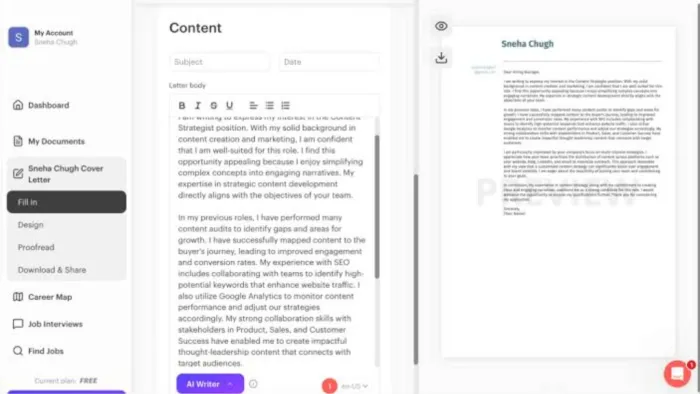
Cover letters are the biggest time sink in applying, and where generic AI output does the most damage, because a cover letter's whole job is to sound like you specifically wanting this role. Use AI for the scaffold (clean structure, tight draft, right length), then do the part that can't be automated: rewrite the first two or three sentences yourself with a specific, true reason you want this role at this company: a product you genuinely admire or a problem you've personally faced that they solve. That opening separates a letter that gets read from one that gets pattern-matched into the reject pile.
Pitfall: Sending the raw output. One survey found 53% of recruiters are annoyed by robotic, impersonal outreach. If your letter could be swapped onto anyone else's application unchanged, it isn't finished.
4. Find and match yourself to roles
AI-powered job-matching platforms and the AI features built into LinkedIn and other boards can surface roles that fit your skills and preferences, some even estimating how well you match a listing. This is a genuine time-saver for discovery, casting a smart net instead of scrolling endless boards.
Pitfall: "Auto-apply" tools that fire off hundreds of applications for you. They optimize for volume, exactly what employers filter against, and strip out the personalization that earns interviews. Use AI to find better roles, not to apply to more indiscriminately.
5. Network at scale without becoming spam
Thoughtful networking still works, but personalizing outreach to dozens of people is tedious. You can use AI (including spreadsheet AI functions that generate a message per row of contacts) to draft tailored notes based on each person's role and something specific you noticed about their work at their company.
Pitfall: The "personalization" has to be real. A message that's obviously a mail-merge, or one that invents a fake connection, does more harm than sending nothing. Only send messages you'd be comfortable having the recipient know were AI-assisted.
6. Prepare for interviews
This is one of AI's most underused and lowest-risk applications. Ask it to generate likely questions from the actual job description, run a mock interview and critique your answers, help you build STAR-method stories (Situation, Task, Action, Result) from real experience so you're not improvising under pressure, and research the company and smart questions to ask. Because prep happens before the conversation and only sharpens how you present true experiences, there's essentially no downside, and candidates consistently report feeling more confident afterward.
Pitfall: Real-time "interview copilot" tools that feed you answers live. Interview-cheating flags have exploded, from single digits to well over a third of analyzed interviews in some 2026 datasets, and getting caught can end a process instantly. Prepare with AI; don't outsource the conversation to it.
7. Research salary and prepare to negotiate
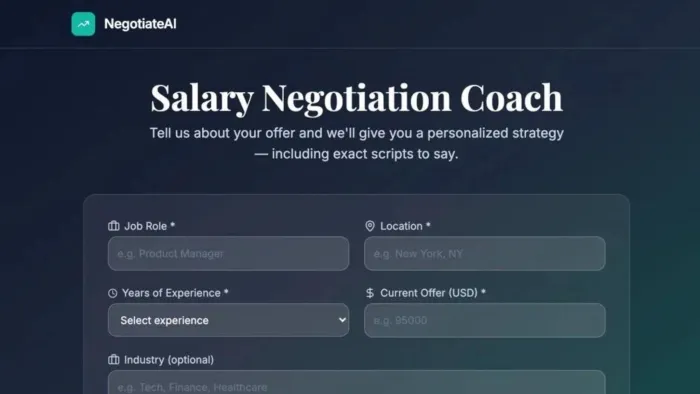
AI-assisted compensation tools analyze thousands of listings and salary surveys to estimate a fair range for your title and experience, adjusted for location, and can suggest benefits worth asking for. You can also use a chatbot to pressure-test an offer and rehearse the negotiation conversation, including what else to ask for, so it's not your first time when it's live.
Pitfall: Treat AI's number as a starting reference, not gospel. Verify against multiple sources for your specific field and region.
8. Automate the busywork
A long search generates endless admin: tracking applications, logging follow-ups, drafting near-identical recruiter replies. Automation can handle the repetitive layer: triaging recruiter emails, logging applications to a tracker, drafting first-pass replies for you to review. Pure upside: it frees your energy for the parts that require a human.
Pitfall: Never let automation send unreviewed. A misfired auto-reply to a hiring manager is a bad first impression you can't take back.
The ATS reality: optimizing without gaming the system
Because roughly 9 in 10 employers run applications through automated screening, a little knowledge protects you. Applicant-tracking systems parse your resume into structured data and match it against the job description via keywords and required qualifications. If the terms the role is built around don't appear on your resume, you can be filtered out before a person sees you, even when you're qualified.
Here's how to satisfy the algorithm honestly:
Mirror the job's language for skills you actually have. If the posting says "stakeholder management" and you've done it, use that phrase, not a synonym the parser might miss.
Keep formatting clean. Standard headings and a single-column layout, with no critical text buried in images, tables, or headers/footers that parsers mangle.
Spell out acronyms once (e.g., "Search Engine Optimization (SEO)") so you match either search.
Don't stuff. Hidden keywords and buzzword-cramming backfire the moment a human reads a resume that's all keywords and no substance.
The mental model: your resume has to clear two judges in sequence: the machine, then the human. Optimizing so hard for the first that you alienate the second is a losing trade.
The risks nobody advertises - and how to protect yourself
A trustworthy guide has to cover the downside. These are the real hazards of AI-assisted job searching in 2026.
AI-detection tools and false positives. Roughly 43% of large employers now run some form of AI-detection (per SHRM data), often as a layer between resume parsing and human review. The problem: these tools are unreliable, with false-positive rates commonly cited between 5% and 25%, and those false positives aren't evenly distributed. Non-native English speakers and academics get flagged more often, as do trained writers, because clean, structured prose "looks like AI." The defense is the same principle throughout: keep your real voice and true accomplishments, with specific details, front and center. Content that's unmistakably you is far harder to flag than content that's unmistakably generic.
The fabrication trap. The most damaging failure mode is getting caught in a claim you can't defend, not getting caught using AI. AI will happily generate an accomplishment you never achieved; in interviews, the inability to discuss your own resume is a top red flag, and there are documented cases of offers rescinded weeks before a start date over it. Rule: never put anything in an application that you can't speak to for five minutes in a live conversation.
Privacy and your data. Be thoughtful about what you paste in. Avoid uploading confidential information from a current employer, and be cautious with sensitive details on lesser-known "auto-apply" services that ask for broad account access.
The over-application trap. AI makes applying to hundreds of roles trivial, and it's tempting to equate volume with progress. But volume triggers filters and dilutes effort, leading to burnout. Ten genuinely tailored applications beat a hundred generic ones.
A Simple, Repeatable AI-Assisted Workflow
A successful job search doesn't come from sending as many applications as possible. It comes from following a process that helps you stay focused and put your best foot forward every time. Here's a simple workflow you can use for every application.
1. Find the right roles.
Start by using AI to review job descriptions and identify positions that match your skills and experience. It's better to apply for fewer roles that are a good fit than to send the same application everywhere.
2. Tailor your resume.
Update your resume for each job by highlighting the experience that matters most. AI can help improve the wording, organize your achievements, and point out important keywords, but every detail should reflect your real work.
3. Write a personal application.
Let AI help you create a first draft of your cover letter or message, then take a few minutes to make it your own. Mention why you're interested in the company and how your experience connects with the role.
4. Prepare before the interview.
Practice answering common interview questions, review your past projects, and learn about the company. The more prepared you are, the more confident you'll feel during the conversation.
5. Keep everything organized.
Track your applications, follow up when needed, and keep notes on each opportunity. Staying organized makes the job search less stressful and helps you focus on the opportunities that matter most.
Using AI this way helps you save time without losing the personal touch that employers are looking for. It supports your job search, but your experience, your voice, and your effort are still what make the difference.
Conclusion
AI can make your job search easier, but it shouldn't do the job for you. The best applications still come from real experiences, honest achievements, and a genuine interest in the role. Use AI to save time, improve your writing, and prepare with confidence-but make sure your final application sounds like you.
At the end of the day, employers aren't looking for the person who used the best AI tool. They're looking for someone who can solve problems, communicate clearly, and add value to their team. Let AI handle the repetitive work so you can focus on showing what makes you the right fit.