Your AI reviewer just left a dozen comments on your pull request. If the research holds, you'll dismiss more than half of them. And the bug that pages you at 2 a.m. next week probably wasn't in the dozen.
AI reviewers are now everywhere, and they are fast and useful. They are also wrong often enough that no major vendor lets them block your merge by default. This post covers what the data says, where AI review earns its keep, and where it quietly fails.
The short answer
Yes, AI can review your code. It gives a first pass faster than any colleague and is reliable on mechanical defects. It is unreliable on anything that requires knowing why your system exists. Use it as your first reviewer, never your last.
AI code review by the numbers
- Adoption is near-universal. Google's 2025 DORA report, built on responses from nearly 5,000 technology professionals, found that 90% use AI at work (Google Cloud).
- Trust lags far behind. In Stack Overflow's 2025 survey, 46% of developers distrusted AI accuracy versus 33% who trusted it, and only 3% trusted it highly. The 2026 survey found about 48% trust AI output only when they can easily verify it, and just 7% trust it for important work decisions.
- AI-written code needs more review, not less. CodeRabbit analyzed 470 open-source pull requests and found 10.83 issues per AI-co-authored PR versus 6.45 for human-only PRs, roughly 1.7 times more. This is a vendor study, so read it as directional.
- Security is improving slowly. Veracode's 2026 report puts the average security pass rate for AI-generated code at 56% across newly tested models.
- AI review already runs at huge scale. Microsoft's internal AI reviewer covers over 90% of its pull requests, more than 600,000 a month (Microsoft). GitHub says Copilot code review has processed over 60 million reviews, and more than one in five code reviews on GitHub now involve an agent.
- Most comments get rejected. An independent study of 31,073 AI review comments across 10,191 pull requests found 36.4% were accepted, 7.3% triggered discussion, and 56.3% were rejected.
What AI code review catches
AI is strongest where defects are cheap for a machine to spot and tedious for a person. The reliable categories are:
- Null and boundary bugs: off-by-one errors, unchecked access, values that can be undefined on one path.
- Missing error handling: the promise with no catch, the status code nobody reads.
- Convention drift: naming and patterns that don't match the rest of the codebase.
- Security patterns: hardcoded secrets, injection-shaped string building, known-vulnerable dependencies.
- Test gaps: a new branch with no matching test case.
It also has speed on its side. GitHub's documentation says a Copilot review usually takes less than 30 seconds. Microsoft reported 10–20% faster median PR completion in early-adopter repositories.
What AI code review misses
These blind spots are the kind that cause incidents.
- Intent. The diff doesn't contain the requirement. Code can be clean and still do the wrong thing.
- Architecture. A reviewer scoped to a change can't ask whether the change belongs in this service at all.
- Cross-repository fallout. Context retrieval stops at the repository boundary, so a contract change that breaks a consumer in another repo goes unseen.
- Performance at scale. In one 2026 benchmark, four of five models scored 0% recall on performance bugs.
- Your confident PR description. In a study of 250 CVE patch pairs, describing a change as bug-free cut vulnerability detection by 16% to 93%. The reviewer reads your description and believes you.
- Noise. Among rejected comments in the study above, 43.3% were false positives. Google's own bar for a code-review check is under 10% effective false positives.
There is also a speed cost that few people mention. In one industrial deployment, developers resolved 73.8% of the AI's comments, but average PR closure time rose from 5 hours 52 minutes to 8 hours 20 minutes.
Difference #1
AI reviewer vs. human reviewer

| AI reviewer | Human reviewer | |
|---|---|---|
| Speed | Seconds to minutes | Hours to days |
| Consistency | Same checks on every PR | Fades with fatigue and diff size |
| Strongest at | Mechanical defects, conventions, known security patterns | Intent, architecture, trade-offs |
| Knows your history | Only what's written in the repo or rules files | Incidents, past decisions, team lore |
| Typical failure | False positives and missed context | Skimming large diffs |
| Side benefit | Frees attention | Spreads knowledge across the team |
Humans have limits too. A study of reviews at Cisco found reviewers work best on 200–400 lines at a time, where they find 70–90% of defects. And defect-hunting is not most of what human review does: research at Microsoft found fewer than 15% of review comments relate to actual defects, with most of the value coming from knowledge transfer and alternative solutions.
Difference #2
AI reviewer vs. linters and static analysis
| Linter / SAST | AI reviewer | |
|---|---|---|
| How it decides | Fixed rules | Model reasoning over code and context |
| Same input, same output | Yes | Not guaranteed |
| Explains findings | Rule ID and short message | Plain-language explanation and suggested fix |
| Novel logic bugs | Rarely | Sometimes |
| Safe to block merges | Yes, for agreed rules | Risky without tuning |
These are layers, not rivals. Mature AI reviewers wrap linters rather than replace them: the deterministic layer produces the finding and the model decides whether it is worth raising. Static analysis has gaps of its own: across 319 real vulnerabilities in 92 C and C++ projects, it flagged the vulnerable function in only 52% of the commits that introduced them.
Difference #3
Diff-only vs. codebase-aware reviewers
| Diff-only | Codebase-aware | Executing | |
|---|---|---|---|
| What it sees | Changed lines | Changes plus an index of the repo | Changes plus runtime behavior |
| Typical cost | Lowest | Higher | Highest |
| Good at | Local bugs, style | Duplicated helpers, cross-file breakage | Bugs that only show when code runs |
Context matters more than the model. One 2026 benchmark reported a mean detection rate of about 26% for diff-only review across eight models, with none above 31%.
7 AI code review tools worth knowing
1. GitHub Copilot code review
- Link: GitHub Docs
- Best for: teams already on GitHub with a paid Copilot plan.
- How it works: you request Copilot as a reviewer, and it labels each comment High, Medium, or Low and offers suggested changes you can apply in a couple of clicks.
- Tuning: repository-wide rules go in
.github/copilot-instructions.md, with path-specific instruction files for subsystems. - The catch: it leaves a comment-only review by default that doesn't count toward required approvals; approvals are in public preview and off by default.
- Cost: included in paid Copilot plans and billed in AI credits per review.
2. CodeRabbit
CodeRabbit is the reviewer many teams meet first. The company reports more than 2 million reviews a week across 17,000 customers. It produces PR walkthroughs, summaries, and inline comments, and it runs on GitHub, GitLab, Bitbucket, and Azure DevOps. Reviews are free on public repositories, with paid plans from $24 per developer per month on annual billing. One fair warning: the 56.3% rejection figure above comes from a study of CodeRabbit comments, so plan to tune it rather than run it on defaults.
3. Greptile
What is it? Greptile is a reviewer that builds a graph index of your codebase before it comments.
Why does that matter? It can tell you a helper already exists two directories away, not just that your function is long.
What's new? Its TREX feature adds an execution layer, on the reasoning that static review only sees what code says, not what it does.
What does it cost? $30 per seat per month, plus $1 per extra review.
What should I doubt? Its headline benchmark. Greptile scored 82% on its own test and 45% when a competitor re-ran the same repositories.
4. ReDeepSeek
What it is: ReDeepSeek is an all-in-one AI assistant whose code assistant writes, debugs, and explains code across 30+ programming languages. There is nothing to install: paste a function or a diff into the chat and ask for a review.
What it isn't: a pull request bot. Its site lists no GitHub or GitLab integration, so it reviews only what you paste and knows nothing about the rest of your repository. Treat it like the diff-only reviewers in Difference #3.
Where it fits: solo developers, students, and freelancers who want a second pair of eyes before opening a PR, or anyone reviewing a snippet from code they can't connect a bot to. It can also analyze uploaded images such as screenshots, and its web search returns cited sources.
Try this prompt: "Review this function as a senior engineer. List bugs, unhandled edge cases, and security risks in order of severity. Skip style comments."
Cost: the free tier allows 50 messages a day. The code assistant is listed under the Professional plan at $18 a month, which also includes a team workspace for up to five people.
5. Cursor Bugbot
One line: Bugbot is a bug-focused reviewer that lives next to the Cursor editor.
Pros
- Reviews automatically on every PR update and reads existing PR comments to avoid duplicate suggestions.
- Takes project rules from
.cursor/BUGBOT.mdfiles and can learn rules from merged pull requests. - Autofix can spawn a cloud agent that pushes fixes to a branch.
- Connects to GitHub, GitLab, Bitbucket, and Azure DevOps.
Cons
- Billing is usage-based since May 2026, so cost grows with PR volume.
- It skips pull requests above its size limit and asks you to split them.
- Findings default to a neutral check status, so they don't block merges unless you configure that.
6. Qodo
Choose it if you need governance. Qodo is the pick for central rules and air-gapped deployment, and it covers GitHub, GitLab, Bitbucket, and Azure DevOps. Its PR reviewer, Qodo Merge, was formerly the open-source PR-Agent.
Skip it if you are a small team that wants a zero-configuration bot on a single repo.
Worth knowing: Qodo also publishes an annual survey. Its 2026 edition found that reviewing and validating AI-written code is now the single biggest bottleneck, cited by 26% of developers and leaders.
7. Claude Code Review
Code Review from Anthropic runs each pull request through four stages:
- Find: several agents examine the diff and surrounding code in parallel.
- Verify: a verification step checks candidate findings against the code and filters false positives.
- Rank: remaining findings are deduplicated and ranked by severity.
- Post: results land as inline comments with a summary and a check run.
The limits: it is available on Team and Enterprise plans for GitHub repositories, never approves or blocks a pull request, and reads code without building or running it. A local /code-review command works in Claude Code on any plan.
Tools at a glance
| Tool | Best for | Platforms | Stands out for |
|---|---|---|---|
| Copilot code review | Teams already on GitHub | GitHub | Zero setup, sub-30-second reviews |
| CodeRabbit | Broad platform coverage | GitHub, GitLab, Bitbucket, Azure DevOps | Free on public repos |
| Greptile | Cross-file logic bugs | GitHub, GitLab, Bitbucket, Gitea | Whole-codebase index |
| ReDeepSeek | Solo developers, pre-PR checks | Web chat | Paste-and-review, no install |
| Cursor Bugbot | Cursor users | GitHub, GitLab, Bitbucket, Azure DevOps | Autofix via cloud agent |
| Qodo | Regulated or large orgs | GitHub, GitLab, Bitbucket, Azure DevOps | Central rules, air-gapped option |
| Claude Code Review | Teams on Claude Team/Enterprise | GitHub | Built-in verification step |
Prices and plans change often, so confirm on each vendor's page before you budget.
How to use AI review without getting burned
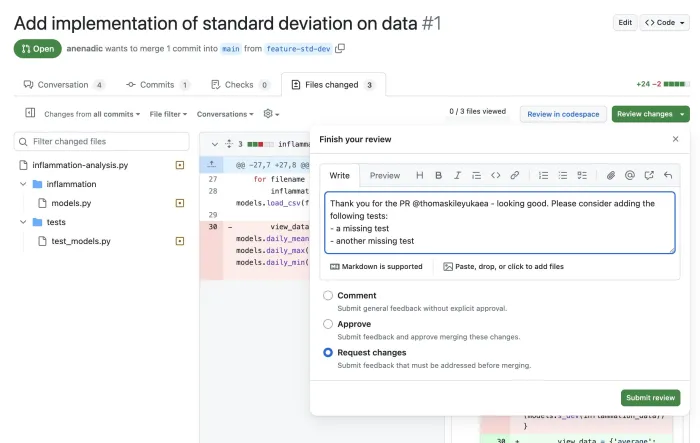
- Run AI first, humans second. GitHub's own advice is to treat automated review as a prerequisite, not a replacement.
- Decide what blocks. Secrets and vulnerable dependencies should fail the build. Style opinions should not.
- Write your rules down. Every PR bot above reads a rules file. A reviewer can only enforce standards that exist.
- Keep PRs small. Both humans and bots degrade on large diffs.
- Have a human trace one critical path. Follow the most important logic change from input to output and check boundaries and permissions.
- Measure acceptance. If your team ignores most comments, tune the tool or switch.
- Trial two tools on your own repo. In one 146-PR field test, 93.4% of findings were caught by exactly one tool, so vendor benchmarks won't predict your results.
Here's an expanded version to replace the current section. It adds a three-point recap and a next step for the reader.
The bottom line
AI can review your code, and you should let it handle the null checks, the missing catches, and the Friday-afternoon consistency work. The questions that decide whether your software works still need a person: does this belong here, does it do what was asked, and what happened last time.
If you remember only three things:
- AI is a first pass, not a verdict. Developers rejected 56.3% of one popular tool's comments in the largest independent study, so a clean AI review is not proof of clean code.
- More AI-written code means more to review. AI-co-authored pull requests carried roughly 1.7 times more issues than human-only ones in CodeRabbit's analysis.
- Context beats cleverness. The tool that knows your codebase and your rules will outperform a smarter one that only sees the diff.
Your next step depends on where you work. On a team, switch on a PR bot for one repository this week and track how many of its comments you act on. Working solo, paste your next change into a chat assistant such as ReDeepSeek before you open the pull request. Either way, keep a human on the final approval, because AI can only find what's wrong in the code while a person knows what the code was supposed to do.